Environments and variables
Values that differ between systems live in environments. Values that must stay secret never enter the collection folder: the file names only the variable, the value lives in the operating system’s keychain or comes from your secret manager.
- Edition
- Free
- Layers
- global, collection, environment, folder, request, runtime
- Files
environments/<name>.yml- Secrets
- keychain (Mac), encrypted in the browser (web)
- Vaults
- 1Password, HashiCorp Vault, AWS, Azure, Google
Where a variable comes from
You write variables as {{name}}. They are resolved in layers; a later layer wins1:
- Global
- Collection (
opencollection.yml) - Environment (
environments/<name>.yml) - Folder (
folder.yml) - Request
- Runtime (for example
--varon the command line or values set by scripts)
The precedence is the same as in Bruno. Hover over a variable in the URL and RequestTailor shows its value and the layer it comes from.
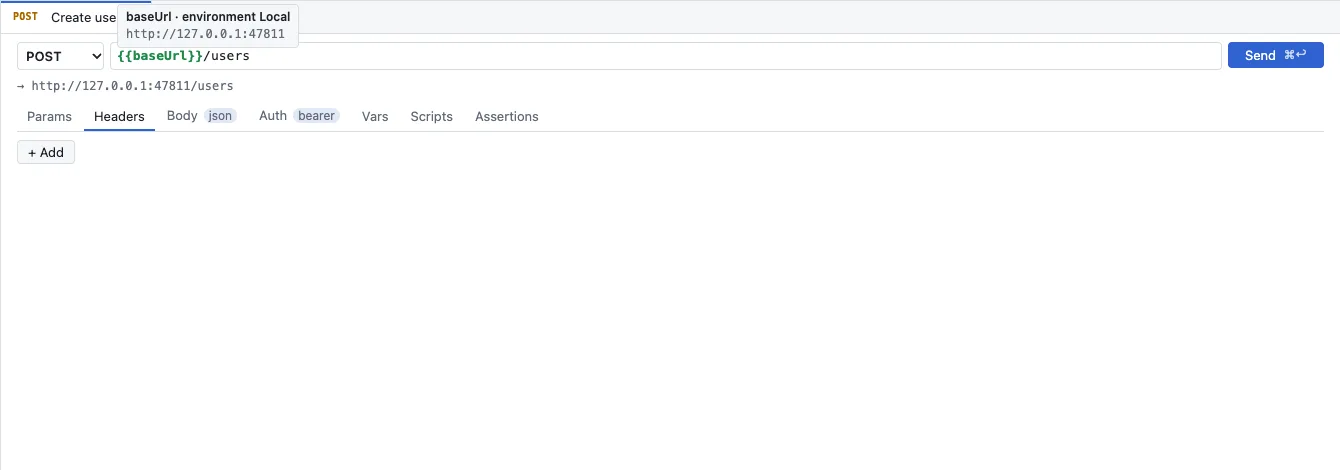
The JSON report of rt send also names the origin of every variable and lists placeholders without a value under unresolved.
Create and switch environments
At the top right you choose the active environment; a dot in front shows its state. Environments next to it opens the manager.
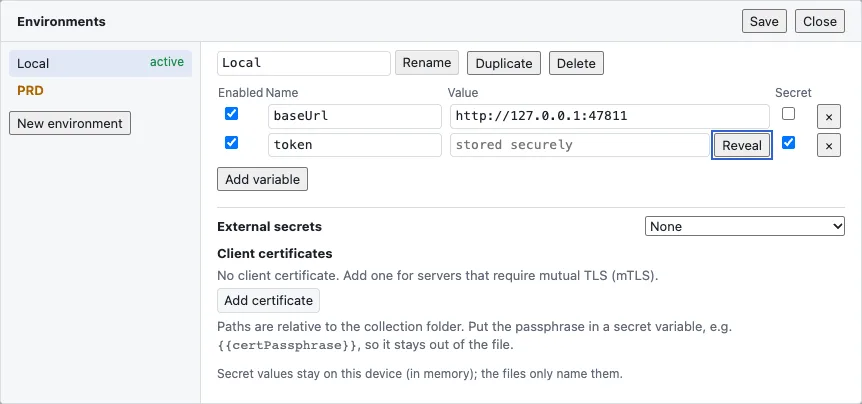
- The environments on the left; New environment creates one.
- Rename, Duplicate and Delete for the chosen environment.
- Per variable: Enabled, Name, Value and the Secret checkbox. A secret shows stored securely; Reveal shows the value briefly.
- External secrets picks a secret manager.
- Client certificates for servers that require mutual TLS.
- Open Environments at the top right and choose New environment.
- Create the variables with Add variable, for example
baseUrl. - For a password or token, create a variable and tick Secret; enter the value once.
- Click Save. RequestTailor writes only the name into the file; the value goes into the keychain.
Secret variables
A secret variable is declared in the environment file without a value:
name: Staging
variables:
  - name: baseUrl
    value: https://api.staging.example.com
  - secret: true
    name: apiToken
The Mac app keeps the value in the operating system’s keychain, the web app keeps it encrypted in the browser’s storage.2 It is added only when a request is sent, and reports show it as ***. OAuth 2.0 tokens are kept the same way. Whoever clones the collection gets the names but no values and enters their own.
Secrets from a secret manager
An environment can read secrets from a secret manager through that manager’s own command line, with your existing login. The file holds only the reference:
name: Staging
externalSecrets:
  type: one-password
  variables:
    - name: apiToken
      secretReference: op://Staging/api/token
type | Command line |
|---|---|
one-password | op |
hashicorp-vault-server, hashicorp-vault-cloud | vault |
aws-secrets-manager | aws |
azure-key-vault | az |
gcp-secrets-manager | gcloud |
Values are held in memory only and masked in every report. The command line runs without a shell and with a 60-second timeout; if it or the login is missing, RequestTailor says what to install or which login command to run. The web app cannot start these programs; there the rt agent --allow-secrets companion reads them (Companion rt agent). The fields per provider are in rt command line.
Client certificates
You configure client certificates (PEM or PKCS#12) per collection or per environment; paths are relative to the collection folder. The passphrase belongs in a secret variable such as {{certPassphrase}} so that it stays out of the file. The Mac app and rt use the certificates; browsers do not let web pages present client certificates, so the web app reports a clear TLS error.
See also
- Features at a glance Features · senden
- Docs Authentication
- Docs Secrets and privacy
- Docs Companion rt agent
- Sources Variables1 · Secrets2