AI assistant
The AI assistant is off until you set it up. RequestTailor has no AI service of its own: you use your own Anthropic key or an OpenAI-compatible model, including one running on your computer.1 Every secret value is removed before each call. What the assistant returns are suggestions – you see them first, and only what you save is saved.
- Edition
- Free
- Where
- command palette: AI assistant: settings…
- Providers
- Anthropic (own key) or OpenAI-compatible, e.g. Ollama, LM Studio
- Default
- off
- Sent
- only when you ask, secrets as
***
Set it up
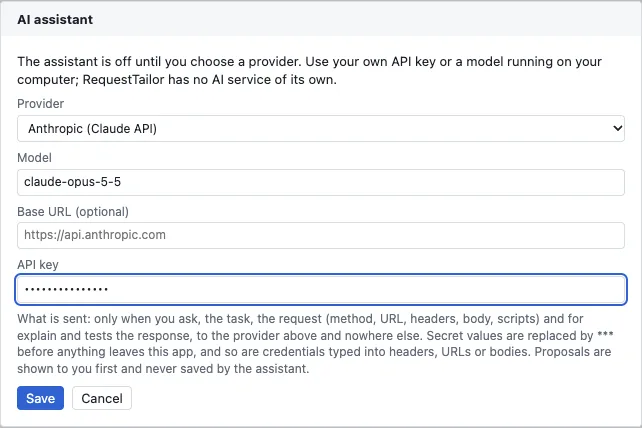
- Open the command palette (Mod+K) and choose AI assistant: settings….
- Under Provider, choose Anthropic (Claude API) or OpenAI-compatible endpoint (e.g. Ollama, LM Studio).
- Enter the Model and, if needed, the Base URL – for a local model, its address on your computer.
- Enter the API key if the provider needs one, and click Save.
The settings live in the data folder, the key in the operating system’s keychain; in the web app both live in the browser, the key encrypted. Remove key deletes the key, Turn off switches the assistant off again. Calls go through the same transport as your requests, straight to the provider you chose and nowhere else.
What the assistant does
Once it is set up and a collection is open, the command palette offers three tasks – each only when it applies:
| Task | Where | Result |
|---|---|---|
| AI: create request from a description… | command palette | A suggested request for the current folder, from your description and the folder’s other requests |
| AI: explain this response | command palette; Explain in the response when it failed (error status, failed test or assertion) | Why the request failed and what to change – in the request, its variables, its auth or on the server |
| AI: suggest tests for this request | command palette; Suggest tests in the Scripts tab once there is a response | A tests script and assertions; Add to request appends them |
Suggestions, not changes
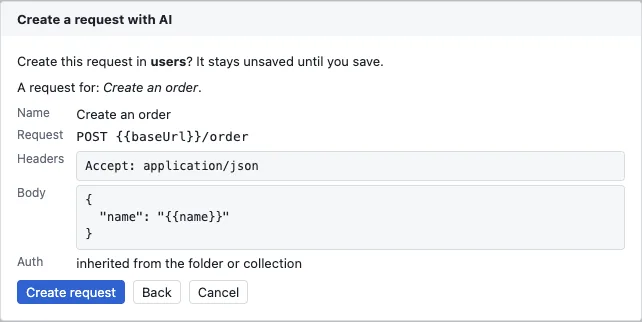
- A new request exists only after Create request, unsaved in the chosen folder. The assistant sets no auth; the request inherits it from the folder or the collection.
- Suggested tests go into the request as an unsaved change with Add to request.
- An explanation changes nothing in the collection.
You review every suggestion like a change from a colleague – and since everything is files, the Git diff shows exactly what changed.
What is sent
Only when you ask: the task and the request (method, URL, headers, body, scripts), and for explanations and tests also the response. Secret values are replaced by *** before anything leaves the app – and so are credentials typed straight into headers, URLs or bodies. The assistant is instructed never to guess masked values and to use variables instead of credentials in its answers.
See also
- Features at a glance Features · Agents
- Docs AI agents and MCP server
- Docs Scripts, tests and runner
- Docs Secrets and privacy
- Sources CLAUDE.md1 · website/docs/privacy2