Scripts, tests and runner
RequestTailor runs scripts in a sandbox: before the request, after the response and as tests. Assertions check status, headers and body without a line of JavaScript. The runner sends a folder or the whole collection in order, also several times and with a data file – and rt run does the same in the pipeline, with the same results.
- Edition
- Free
- Where
- Scripts and Assertions tabs of the request; Run in the header
- Engine
- QuickJS as WebAssembly, sandboxed
- Limits
- 5 s per phase, 64 MiB of memory (default)
- Pipeline
rt run, exit code 4 on failure
Three phases: pre-request, post-response, tests
The Scripts tab of a request has three fields. Each is optional; the number on the tab shows how many are filled.
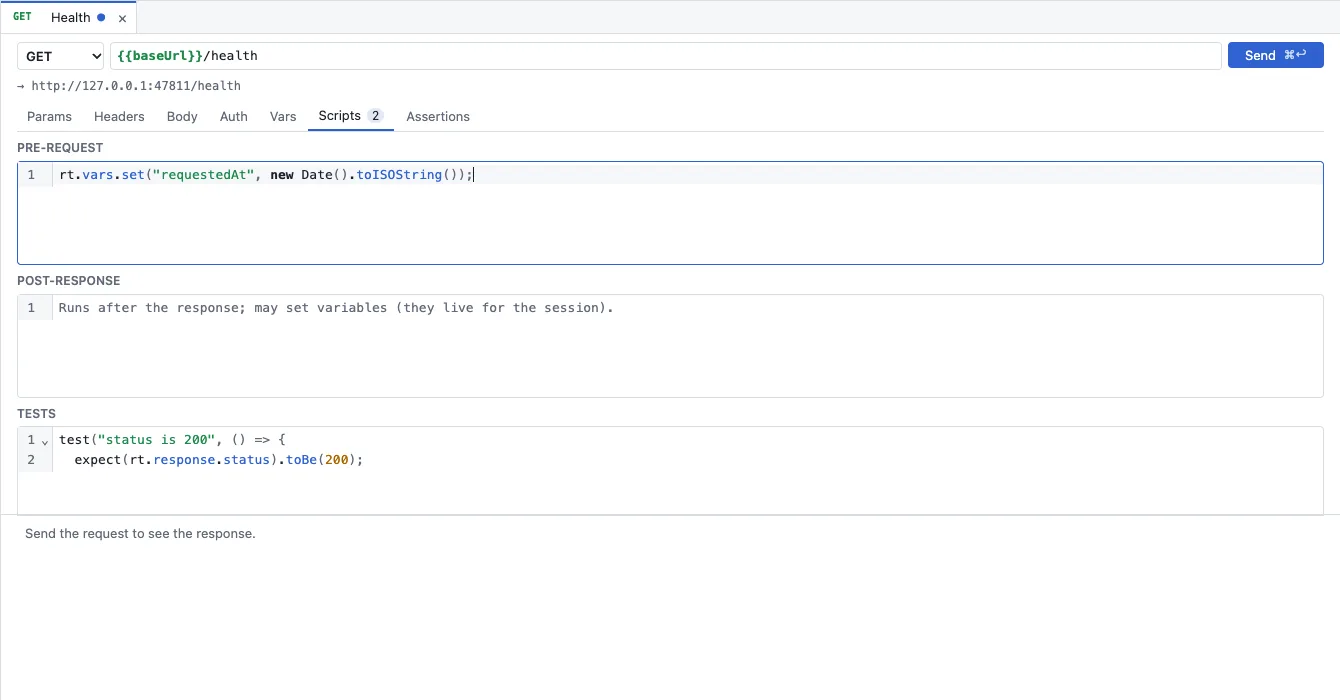
- Pre-request runs before sending. It may change the request (URL, headers, body) and set variables; what it sets goes into the runtime layer and applies to this request already.
- Post-response runs after the response, for example to keep a token from the body for the next requests.
- Tests runs last. Every
test("…", () => …)appears with its name and result in the response’s Tests tab.
Scripts also exist at folder and collection level. They run in this order: collection, folders from the outside in, request. All scripts of one phase share one scope; each phase starts fresh.
// Pre-request: a timestamp as a variable
rt.vars.set("requestedAt", new Date().toISOString());

// Post-response: keep a token for the session
rt.vars.set("token", rt.response.json().access_token);

// Tests
test("status is 200", () => {
  expect(rt.response.status).to.equal(200);
});
The API is called rt: rt.request, rt.response, rt.vars, rt.info, rt.sendRequest, rt.sleep and rt.runner, plus test, expect (the common chai words) and console. The complete types are in crates/rt-script/api.d.ts in the core repository.
Trust: scripts run only when you allow it
A collection from someone else’s repository can contain scripts. That is why RequestTailor asks once per collection and device. Above the interface, “This collection contains scripts. Run them?” appears with Trust and run scripts and Not now.
- Until you trust it, requests are sent without scripts; the report then carries a warning note.
- Not now hides the question for this collection until the next start.
- Assertions always run: they are not JavaScript but are evaluated in the core.
Variables from scripts
rt.vars.set(name, value, layer) writes into one layer: runtime (default), environment, collection or global. It writes in memory only: in the app for the session of the selected environment, in the runner and in rt run for the run. A script never writes files – the files in the repository stay the truth.
Values are strings. Numbers, booleans and objects are stored as JSON; in the same phase the script reads the value back with its type, later as text. The Session variables button shows and clears the variables of the session.
Assertions without JavaScript
The Assertions tab checks the response declaratively: Expression, Operator, Value. Expressions are for example res.status, res.headers.name, res.responseTime or a path into the body such as res.body.items[0].id.
| Group | Operators |
|---|---|
| Comparison | eq, neq, gt, gte, lt, lte, between |
| Lists and text | in, notIn, contains, notContains, length, matches, notMatches, startsWith, endsWith |
| Without a value | isEmpty, isNotEmpty, isNull, isUndefined, isDefined, isTruthy, isFalsy, isJson, isNumber, isString, isBoolean, isArray |
The operators are Bruno’s, in Bruno’s order, so Bruno assertions run unchanged. Under Variables from the response you also create variables from the response, again without a script.
Postman, Bruno and Insomnia scripts
Imported scripts stay as they are. bru.*, req, res, pm.*, postman.* and insomnia.* run as shims on the rt API.2 On top come built-in modules for require: crypto-js (hashes, HMAC, PBKDF2, no ciphers), lodash (about 130 functions), moment (no time zones), uuid (v4), chai, tv4, ajv, atob/btoa.
What is missing fails with a clear error instead of a meaningless TypeError, and the import’s loss report names every unsupported API with the request it is in. The main differences:
- No Node.js: no
fs,path,Buffer,processorfetch. bru.setEnvVar(…, { persist: true })and Postman’s environment writes do not change files.setTimeoutandbru.sleeprun onrt.sleepand count against the time limit.- Bruno’s gRPC and WebSocket scripts (
bru.grpc,onMessage) do not run.
The complete list with a status per API is in crates/rt-script/SHIM-COVERAGE.md in the core repository.
The runner
The runner sends every request of a folder or the collection in order: folders and requests by their order (seq), then by name, folders depth first. Variables that scripts set apply to the following requests of the run.
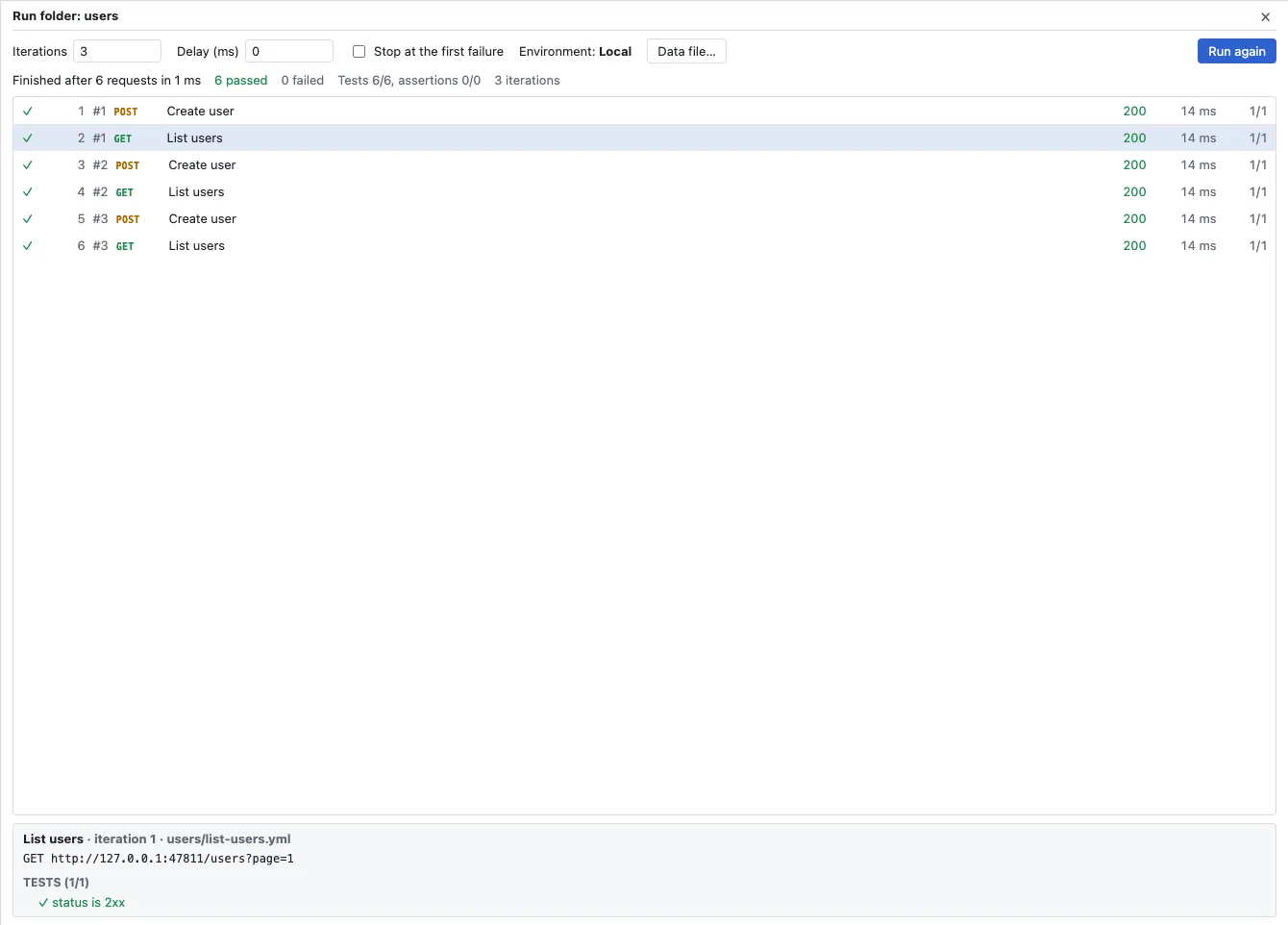
- Click Run in the header (the whole collection) or a folder’s run button; in the command palette (Mod+K) the entry is Run collection.
- Set Iterations, Delay (ms) and Stop at the first failure if needed. The environment is the one selected at the top.
- For data-driven runs, choose a CSV file (header row, then one row per iteration) or a JSON file (an array of objects) with Data file…. Each row becomes variables of its iteration.
- Start the run. Each row shows method, name, status, time and passed tests; clicking a row shows its request and test results below.
Scripts steer the run with rt.runner.skip() (skip this request) and rt.runner.setNext(name) (continue with another request; null ends the run).
In the pipeline: rt run
rt run uses the same core, the same scripts, plugins and auth as the apps. What is green in the app is green in the pipeline.3
rt run api/users -e Staging --var token=$API_TOKEN
rt run . --data users.csv --reporter junit=reports/junit.xml --reporter json=reports/run.json| Option | Meaning |
|---|---|
--data FILE | CSV or JSON; each row is one iteration |
--iterations N | Run the requests N times |
--delay MS | Pause between requests |
--bail | Stop at the first failure |
--reporter NAME[=FILE] | text, json or junit, repeatable |
--no-scripts | Without scripts; assertions still run |
--no-prompt | An OAuth 2.0 flow that needs a person fails instead of waiting |
Exit code 4 means a request, a test or an assertion failed. 0 means everything passed – an HTTP 500 without a test counts as passed. Secrets come in as variables of the CI job through --var, never into the collection. There is an action for GitHub and a Docker image for GitLab and others; examples are in rt command line.
See also
- Features at a glance Features · Tests
- Docs rt command line
- Docs Import
- Docs Environments and variables
- Sources api.d.ts1 · SHIM-COVERAGE.md2 · rt-cli/README.md3