OData and SAP
The OData plugin turns RequestTailor into a client that knows how SAP services behave: it reads $metadata, fetches CSRF tokens, keeps ETags, builds $batch requests and runs draft actions.1 Your requests stay plain files. The RequestTailor core contains no SAP knowledge; the plugin uses the same public plugin API as any other.
- Edition
- Free
- Switch on
- choose “SAP and OData” at first start or later in the plugin settings
- Protocols
- OData V2 and V4
- Where
- collection tabs OData and SAP systems; request tabs Query, Batch, Draft
- Pipeline
rt send … --plugin odata.wasm
Switch the plugin on
The OData plugin ships with the app but is active only if you choose SAP and OData at first start – or switch it on later in the plugin settings. If you do not choose SAP, you see nothing of SAP: a disabled plugin has no tabs and no hooks.
Before installing, it shows its permissions, like every plugin (see Plugins):
- network – only to the host of the request being sent;
- storage – a store of its own for cached metadata, CSRF tokens and ETags;
- variables – the non-secret variables, for
sapClientandsapLanguage.
| Service | Typical root | Protocol |
|---|---|---|
| SAP Gateway services on S/4HANA | /sap/opu/odata/sap/<SERVICE>/ | OData V2 |
| RAP business services | /sap/opu/odata4/sap/<service>/srvd_a2x/…/0001/ | OData V4, with draft |
| CAP services | /odata/v4/<service>/, V2 adapter /odata/v2/<service>/ | OData V4 with draft, and V2 |
Connect your own system
- Create a collection or import the service’s
$metadata– from the system or as an API specification from the SAP Business Accelerator Hub (EDMX, or OpenAPI withx-sapextensions). The importer creates requests per entity set and operation: list, read by key, create, update and delete as far as the entity set allows. - In the collection tab SAP systems, create the DEV, QAS and PRD environments from a template: host, client, language and user. The password is created as a secret without a value.
- Enter the password once; it stays in the keychain, the environment file holds only its name.
- Pick an environment and send. The plugin adds
sap-clientandsap-languageto the URL unless they are already there.
# environments/QAS.yml
name: QAS
variables:
  - name: baseUrl
    value: https://s4-qas.example.com
  - name: sapClient
    value: "200"
  - name: sapLanguage
    value: EN
  - name: user
    value: JDOE
  - secret: true
    name: password
The same requests run against all three systems this way; only host, client and user differ.
Entities from $metadata
The collection tab OData shows the service model: version, namespace, entity sets with keys, properties, types and labels, navigation and operations (actions and functions). The model is cached per service root.
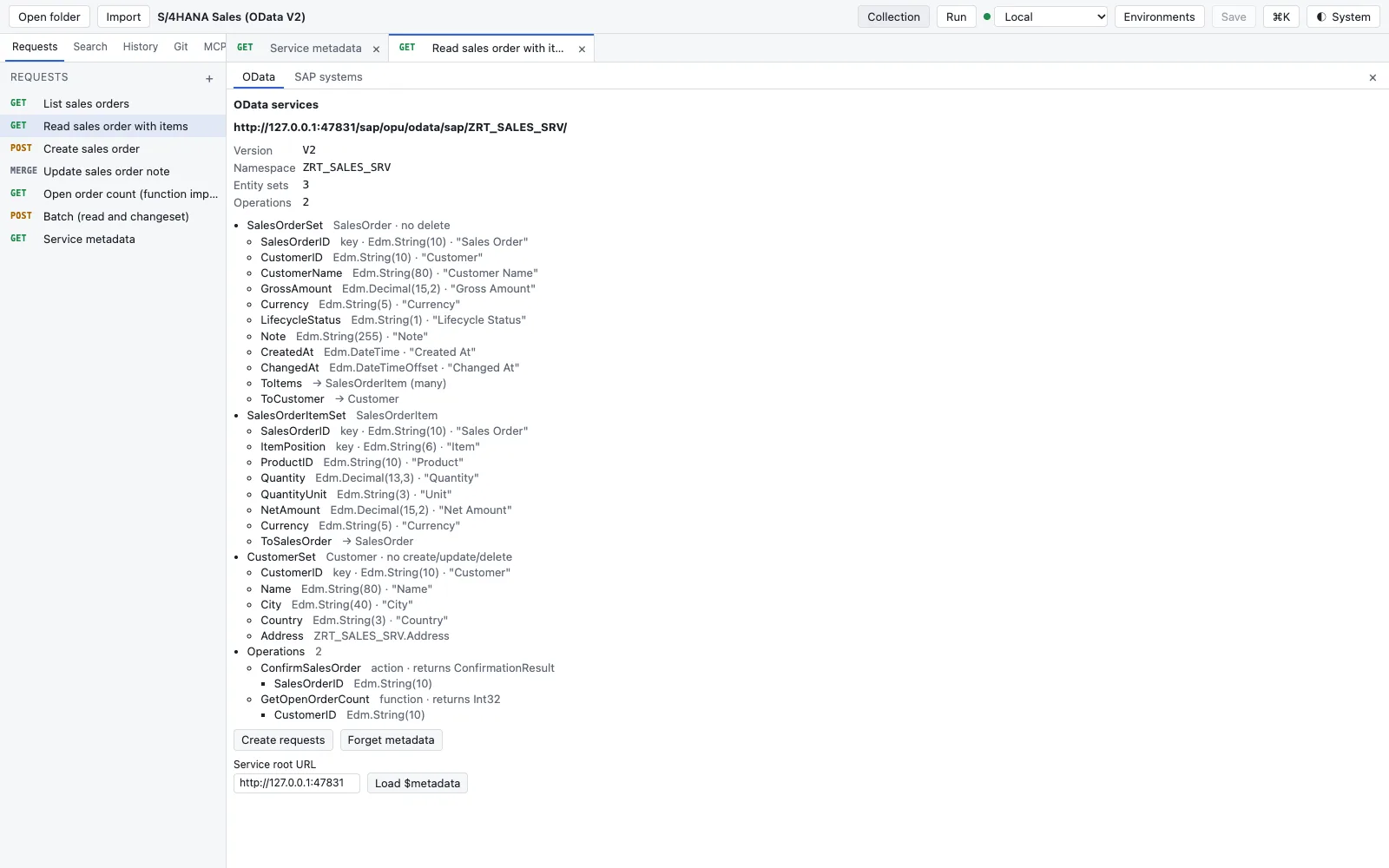
- Header: service URL, version, namespace, number of entity sets and operations.
- Per entity set its properties with key, Edm type and label; notes such as no delete when the service does not allow something.
- Create requests proposes requests for the service; you confirm what is created. New requests stay unsaved until you save.
- Load $metadata loads the model from the Service root URL, Forget metadata drops the cache.
Build queries
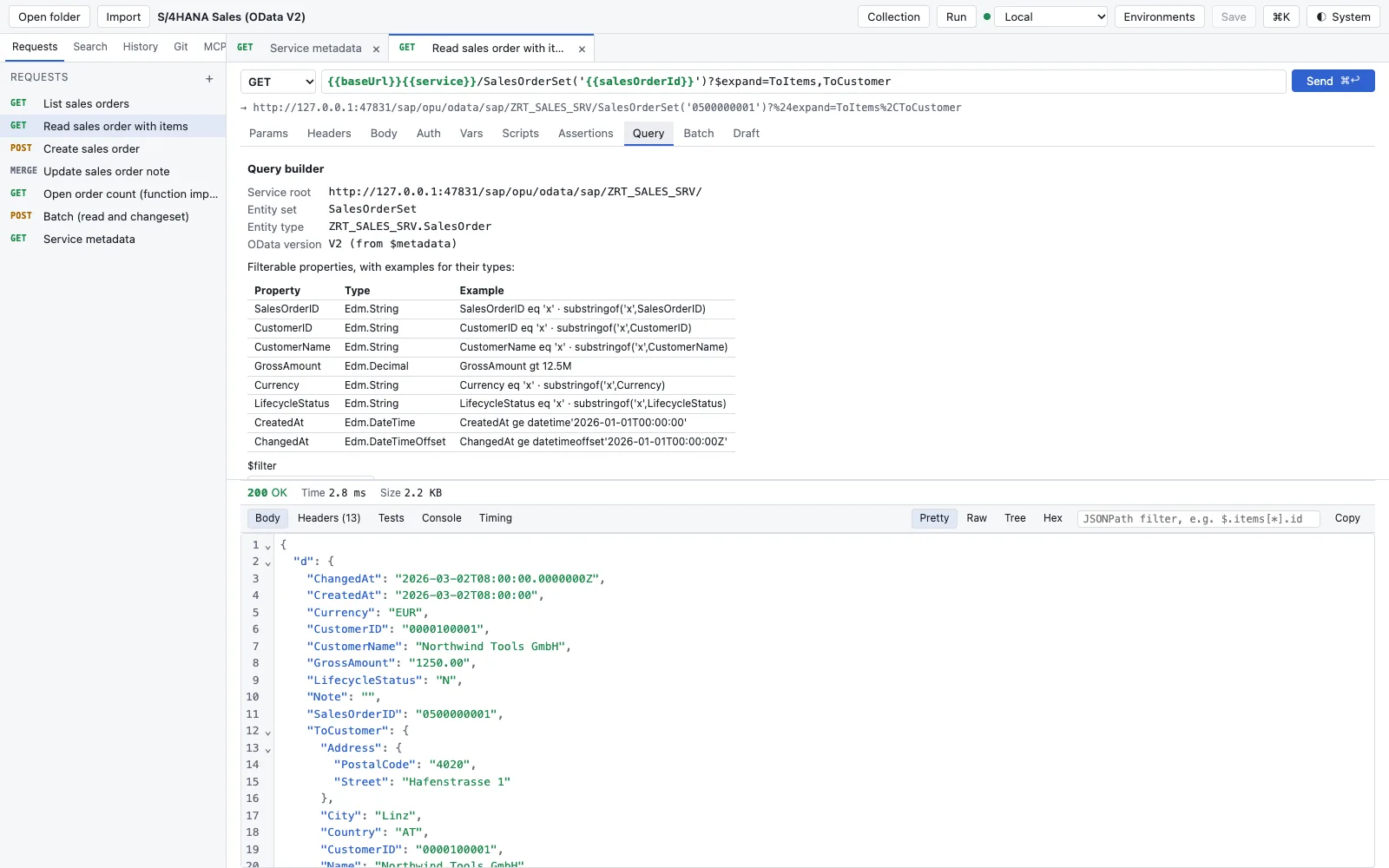
In the request tab Query, the query builder offers $filter, $expand, $select, $orderby, $top, $skip and $count (V4) or $inlinecount (V2) from the model and writes them into the request URL. The URL stays the truth; you can change it by hand at any time.
Writing: CSRF tokens and ETags
SAP Gateway and many CAP deployments protect writing requests with a CSRF token bound to the session cookie. Before a POST, PUT, PATCH, MERGE or DELETE without X-CSRF-Token, the plugin fetches one with X-CSRF-Token: Fetch – in the same session as the request – and sets it. When the server answers 403 with X-CSRF-Token: Required, the next send fetches a new one.
For optimistic locking, read the entity first. The plugin remembers its ETag (the ETag header, @odata.etag or __metadata.etag) and sets If-Match on the next update or delete of that entity, unless you set the header yourself. In OData V2 the update method is usually MERGE (newer Gateway releases accept PATCH too); in V4 it is PATCH.
$batch
The Batch tab composes a $batch request from read parts and changesets (groups of writes that apply all or nothing) – as multipart for V2 and V4 or as JSON for V4 – and shows the response part by part with its status. A batch is an ordinary request file; you can also write the body by hand.
Drafts in RAP and CAP
Draft-enabled entities have two instances per key: the active one (IsActiveEntity=true) and the draft (IsActiveEntity=false). The Draft tab walks through the lifecycle:
| Step | RAP | CAP |
|---|---|---|
| Draft of an active instance | bound action Edit | bound action draftEdit |
| Change the draft | PATCH on the draft | PATCH on the draft |
| Validate | Prepare | draftPrepare |
| Save | Activate | draftActivate |
| Throw away | Discard | DELETE on the draft |
Try it locally and in the pipeline
The core repository contains a synthetic OData test service and three example collections – without real SAP data:
cargo run -p rt-odata-testserver # http://127.0.0.1:47830examples/s4hana-sales– OData V2 in SAP Gateway style: sales orders,$expand,MERGE, a function import,$batchwith a changeset;examples/cap-bookshop– a CAP bookshop as OData V4 with drafts and through the V2 adapter;examples/rap-salesorder– a RAP business object with the whole draft lifecycle.
Choose the Local environment; for the S/4 examples, enter the test password RT_PASS as the value of the secret password. The plugin runs in rt send too, with the same CSRF and ETag handling:
rt send sales/read-sales-order.yml --env QAS --var password="$QAS_PASSWORD" --plugin odata.wasm --prettySAP, SAP S/4HANA and SAP Gateway are trademarks or registered trademarks of SAP SE in Germany and other countries. RequestTailor is not a product of SAP SE and is neither offered nor endorsed by it.
See also
- Features at a glance Features · SAP
- Docs Plugins
- Docs Import
- Docs Environments and variables
- Sources plugins/odata/README.md1 · rt-plugin/API.md2