AI agents and MCP server
rt mcp offers a collection to coding agents as tools over the Model Context Protocol.1 The agent sends requests exactly as you would – from the same files, with the same core. You decide per environment what it may do. The default is read-only; a writing request against production waits until you approve it. The agent never sees secret values, and every call goes into a local audit log.
- Edition
- Free
- Start
rt mcp <collection>(stdio)- Default
- read-only
- Approval
- banner in the app or
rt approve/rt deny - Audit log
agents/audit.jsonlin the data folder, local only
Connect an agent
rt mcp speaks MCP over stdin and stdout (JSON-RPC). The MCP client starts the process itself; you only give it the command. In Claude Code:
claude mcp add requesttailor -- rt mcp /path/to/collectionOther clients such as Cursor, VS Code or Claude Desktop take the same command in their JSON configuration:
{
  "mcpServers": {
    "requesttailor": {
      "command": "rt",
      "args": ["mcp", "/path/to/collection", "--env-default", "DEV"]
    }
  }
}| Option | Meaning |
|---|---|
--var NAME=VALUE | Variable for every send, such as a token; treated as a secret – the agent only sees *** and may not override it |
--env-default NAME | Environment when the agent names none |
--approval-timeout SECONDS | How long a request waits for approval (default 300); then it fails and nothing is sent |
--no-scripts | Do not run scripts |
--agent-name NAME | Name for approvals and the audit log when the client sends none |
--body-limit BYTES | How much of the response body the agent gets per request (default 64 KiB) |
The tools
| Tool | Kind | What it does |
|---|---|---|
list_requests | read-only | Path, name, method and effect (read or write) of every request |
get_request | read-only | One request as the model sees it; credentials masked |
list_environments | read-only | The environments the agent may use, with access, production flag and non-secret values |
send_request | destructive | Sends one request and returns the masked report |
run_folder | destructive | Runs a folder or the collection like rt run; every request is checked on its own |
Every call reads the files anew – the agent always works with the current state of the repository.
Access per environment
What agents may do belongs to the collection and lives in opencollection.yml. In the app you set it in the Agent access dialog (command palette: Agent access…).
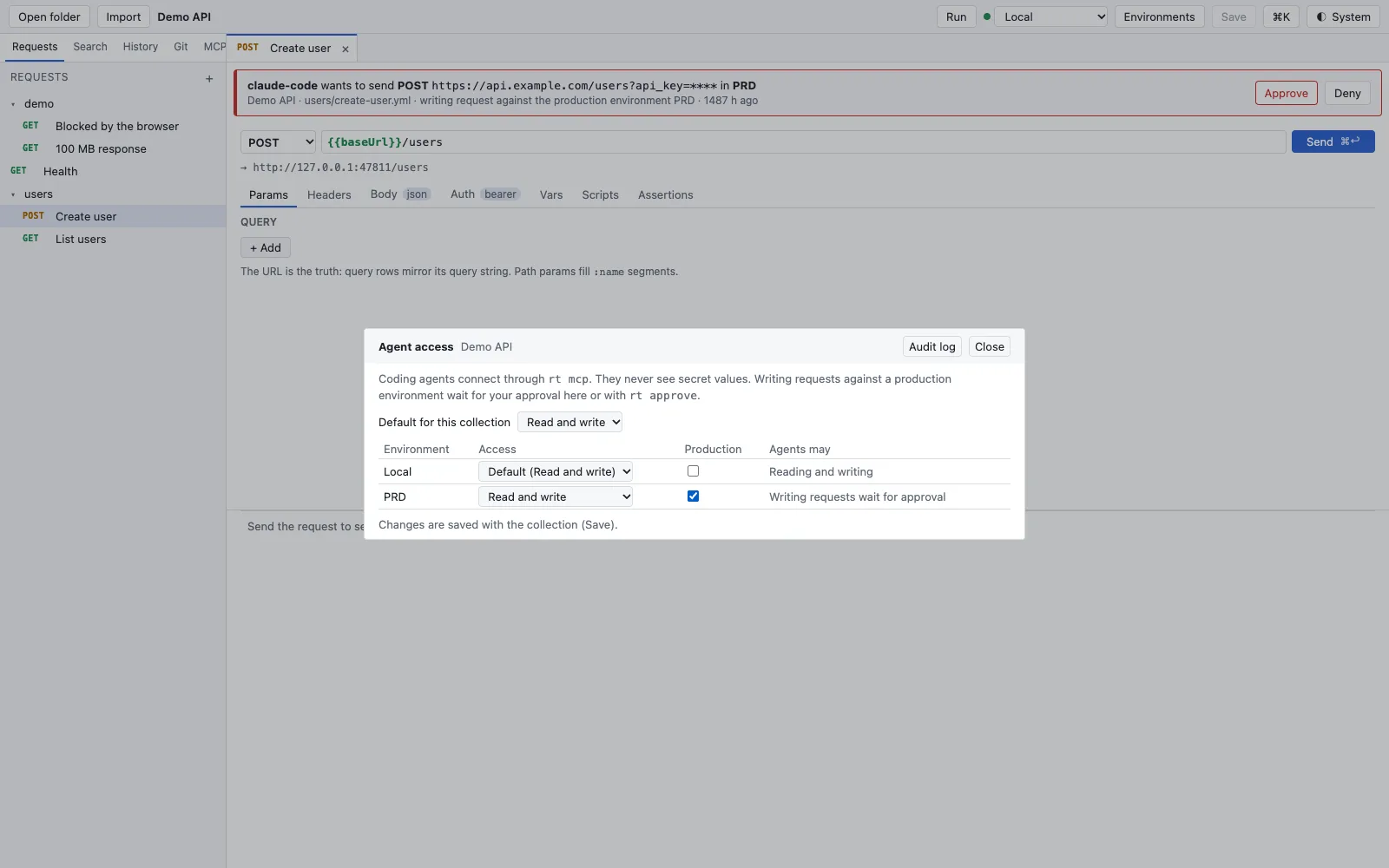
- Default for this collection applies to every environment without a rule of its own.
- Per environment, Access: no access, read only, or read and write.
- Production marks a production environment. If an environment is named like production but not marked, the dialog points it out.
- Agents may sums up what follows. It is saved with the collection (Save).
extensions:
  requesttailor:
    agents:
      access: read                 # default: none, read or write
      environments:
        DEV: { access: write }
        PRD: { access: write, production: true }
HR: none # hidden from agentsnone: agents do not see the environment and cannot send in it.read: only reading requests go out, writing ones are refused. This is the default.write: writing requests go out – except in an environment withproduction: true. There every writing request waits for your approval.
Reading or writing?
GET, HEAD, OPTIONS and TRACE read, everything else writes. GraphQL reads as long as the document contains no mutation; gRPC writes; a WebSocket writes as soon as it sends messages. list_requests shows the agent this classification up front.
Approvals
A writing request against a production environment writes an approval request to the data folder and waits.1 You answer in one of three places; the first answer wins:

- in the Mac app: a banner on every screen with method, masked URL, environment and agent, with Approve and Deny;
- on the command line:
rt approvalslists what is waiting (--jsonfor scripts),rt approve <id>andrt deny <id>answer; - in the MCP client itself, if it supports MCP elicitation (a yes/no question). The client’s answer counts as yours – only use this with clients that ask a person, not the model.
Denied, timed out or cancelled: the request is not sent, the agent gets an error that says so, and the approval request is removed.
The audit log
Every tool call and the start of every session append one JSON line to agents/audit.jsonl in the data folder: time, agent, tool, collection, request, environment, method, masked URL, status, outcome (read, sent, refused, denied, timed out, failed), who approved (app, command line, elicitation) and a detail. In the app, Agent audit log… in the command palette shows it. The log stays on this computer; nothing is sent anywhere.
What limits the agent
- No secret values. The core masks reports already. On top of that,
rt mcpreplaces every secret value the process knows with***in every message to the agent and every audit line – also when a server echoes a token back in its body.get_requestandlist_environmentsleave secret values out. - Rules pinned at start. An agent that can edit files could otherwise give itself write access. Later changes apply only where they are stricter; loosening needs a restart.
- Agent variables redirect nothing. They may override neither variables of the collection, the environment or
--var(base URLs and credentials live there) nor any secret name. - OAuth sign-ins that need a browser or a code are not started by
rt mcp; it uses a token the app has already fetched. - Scripts run only in collections you trusted in the Mac app, and not with
--no-scripts. Requests a script sends itself are not checked against the rules – do not trust collections whose scripts you do not know.
More on the security model on the Security page.
See also
- Features at a glance Features · Agents
- Docs MCP client
- Docs AI assistant
- Docs rt command line
- Docs Secrets and privacy
- Sources rt-cli/README.md1 · CLAUDE.md2