RequestTailor Preview (22 November 2026): requests as files in Git, no account, offline – on the Mac, in the browser and in the pipeline. What’s inside → +43 664 1964199Contact →
Editions · Preview

Free is complete. The rest comes on top.

Free costs nothing, is open source under Apache 2.0 and includes everything RequestTailor can do today. Pro, Team and Enterprise are in the works and come with new features, not with locks on existing ones. The prices are set, all net plus VAT.

In the works Pro and Team do not exist yet. If you want to try them first, note a trial licence.

Free

Free. For every person and every team with Git.

€0forever, no account

For: Developers, testers and teams who share their requests in Git

  • Requests as YAML files in your repo, Git in the app
  • HTTP, gRPC, WebSocket, SSE and GraphQL
  • OAuth 2.0, AWS SigV4, client certificates, secrets in the keychain
  • Scripts, tests, runner and rt run for the pipeline
  • MCP server with approvals, AI with your own key
  • OData plugin for S/4HANA, CAP and RAP
  • Open source under Apache 2.0

Get it free

ProIn the worksEverything in Free, plus

For everyone who works on several devices.

€7per user and month, or €69 per user and year, excl. VAT

For: Individuals who switch between Mac, browser and laptop; SAP consultants

  • Everything in Free
  • Sync between your devices, end-to-end encrypted
  • AI quota without your own key
  • SAP comfort: import BTP service keys, destinations as environments

Buy: Pro Note a trial licence

TeamIn the worksEverything in Pro, plus

Everything in Pro, plus shared workspaces.

€14per user and month, or €138 per user and year, excl. VAT

For: Teams who work on the same collections at the same time

  • Everything in Pro
  • Real-time workspaces
  • Roles
  • Shared vault for secrets

Buy: Team Note a trial licence

EnterpriseIn the worksEverything in Team, plus

Everything in Team, plus corporate IT.

on request

For: Companies with SSO, policies, audit and their own operations

  • Everything in Team
  • SSO and SCIM
  • Audit export and policies
  • Self-hosting, licence file for air-gapped use

Ask about Enterprise

In the works Pro, Team and Enterprise are in the works. The prices are set; you can buy once the edition’s first feature is out – until then the button leads to an enquiry.

Fairness guarantee

What is free once stays free.

No Free feature will later move behind a paywall. That is not only written here but in the project's rules.

  1. The core is licensed under Apache 2.0. On its own it builds the complete Free edition and contains no licence check, no placeholders for Pro and no login dialog.
  2. Paid features are built in a separate module. The core knows at most the question “unlocked: yes or no” – without the module the answer is Free.
  3. In future too. Free opens no connection to CloudDNA servers.
  4. New editions bring new features. Sync, real time, a vault and SSO need servers and operations; whoever uses them pays for them.
Comparison

Every feature, every edition.

A dot means included, a circle: planned and in the works. Each edition includes everything from the editions before it. Click a feature to read its description.

● included · ○ planned, in the works · – not included. All prices net plus VAT.
FeatureFreeProIn the worksTeamIn the worksEnterpriseIn the works
Files and Git
Requests as YAML filesincludedincludedincludedincluded
Byte-identical read and writeincludedincludedincludedincluded
Git without a staging areaincludedincludedincludedincluded
Secret scanner before the commitincludedincludedincludedincluded
Import with a loss reportincludedincludedincludedincluded
Sync between your devicesIn the worksnot includedplanned, in the worksplanned, in the worksplanned, in the works
Sending, variables, auth
Send with one keystrokeincludedincludedincludedincluded
Large responses without stutterincludedincludedincludedincluded
Variables with originincludedincludedincludedincluded
Secrets in the keychainincludedincludedincludedincluded
OAuth 2.0, AWS SigV4, certificatesincludedincludedincludedincluded
Shared vault for the teamIn the worksnot includednot includedplanned, in the worksplanned, in the works
Tests and pipeline
Scripts in a sandboxincludedincludedincludedincluded
pm.* and bru.* keep workingincludedincludedincludedincluded
Assertions without JavaScriptincludedincludedincludedincluded
Runner and rt runincludedincludedincludedincluded
rt mock and rt docsincludedincludedincludedincluded
gRPC, WebSocket, SSE, GraphQL
gRPCincludedincludedincludedincluded
WebSocketincludedincludedincludedincluded
Server-sent eventsincludedincludedincludedincluded
GraphQLincludedincludedincludedincluded
AI agents and MCP
MCP server rt mcpincludedincludedincludedincluded
Approval for writes to productionincludedincludedincludedincluded
MCP client with testsincludedincludedincludedincluded
AI assistant with your own keyincludedincludedincludedincluded
AI quota without your own keyIn the worksnot includedplanned, in the worksplanned, in the worksplanned, in the works
OData and SAP
OData plugin: entities and query builderincludedincludedincludedincluded
CSRF, ETag, $batch and draftsincludedincludedincludedincluded
DEV, QAS and PRD with sap-clientincludedincludedincludedincluded
Plugins as WebAssemblyincludedincludedincludedincluded
BTP service keys and destinationsIn the worksnot includedplanned, in the worksplanned, in the worksplanned, in the works
Team and Enterprise
Sharing through Gitincludedincludedincludedincluded
Real-time workspacesIn the worksnot includednot includedplanned, in the worksplanned, in the works
RolesIn the worksnot includednot includedplanned, in the worksplanned, in the works
SSO and SCIMIn the worksnot includednot includednot includedplanned, in the works
Audit export and policiesIn the worksnot includednot includednot includedplanned, in the works
Self-hosting and air gapIn the worksnot includednot includednot includedplanned, in the works
Price€0€7per user and month, or €69 per user and year, excl. VAT€14per user and month, or €138 per user and year, excl. VATon request
BuyGet it freeBuy: ProBuy: TeamAsk about Enterprise
In detail

What each feature does – edition by edition.

For each feature: which problem it solves, how to use it and which docs page explains it step by step.

Free Free. For every person and every team with Git.

  • Files and Git

    Requests as YAML files

    Puts every request as a readable file in your project folder. Reviews, diffs and blame work as with code, without an export and without an account.

    OpenCollection format (YAML), one file per request, folders as folders. The app is only a view of the folder.

    In the app: Sidebar › CollectionDocs: Collections as files →

  • Files and Git

    Byte-identical read and write

    Makes sure a commit shows only what you changed. Opening and saving reformats nothing; Bruno collections open unchanged.

    Unchanged parts stay byte-identical, tested on 86 Bruno collections. What a writer cannot do, it refuses.

    Docs: Collections as files →

  • Files and Git

    Git without a staging area

    Brings commit, branch, pull and push into the app without having to learn Git first. Whoever prefers the terminal sees the same files there.

    Commit with chosen files, branches, pull, push and resolving conflicts; refuses while there are unsaved changes.

    In the app: Sidebar › GitDocs: Git →

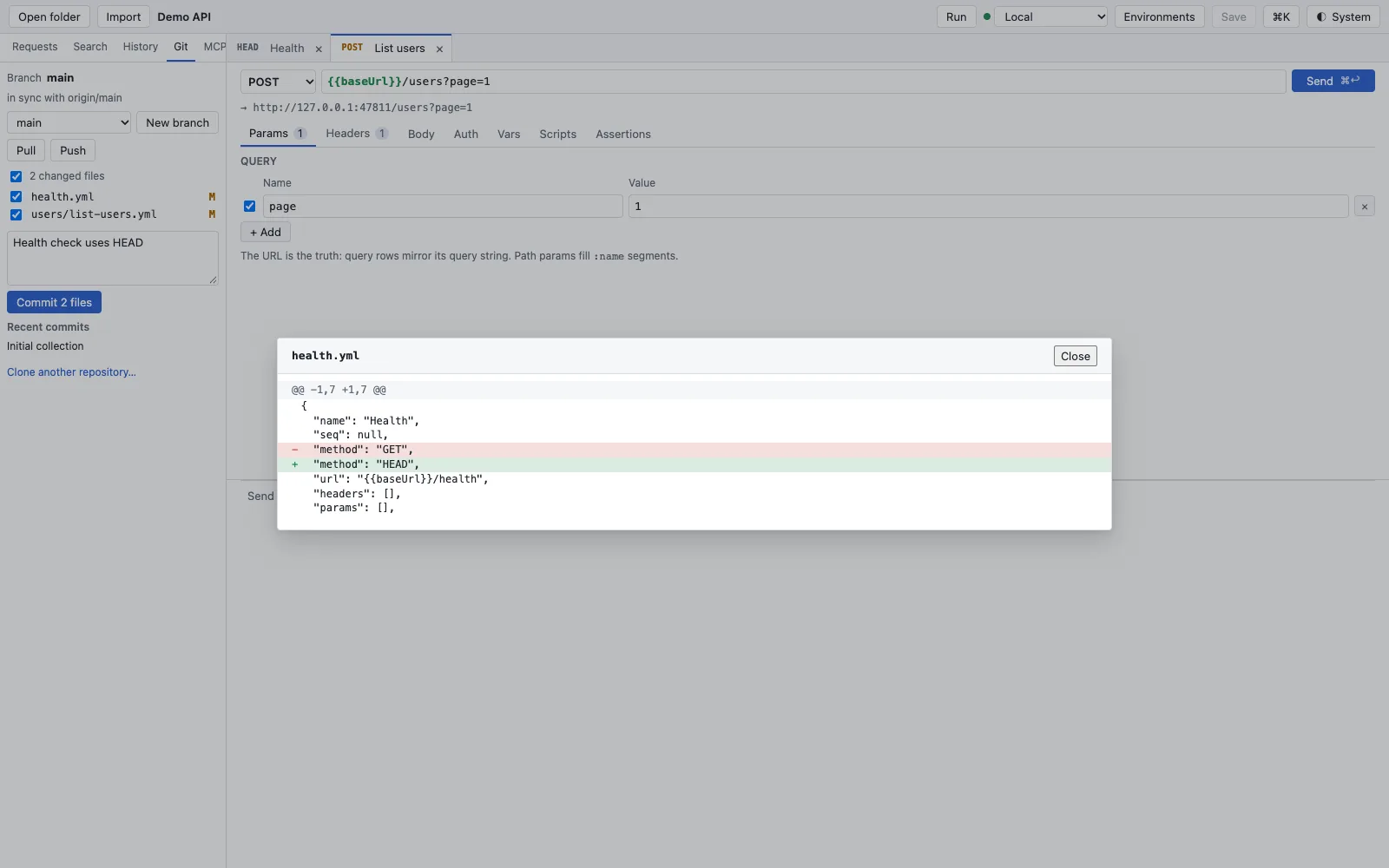
    Git sidebar with branch main, in sync with origin/main, two changed files health.yml and users/list-users.yml, above it a diff of health.yml where the method changes from GET to HEAD
  • Files and Git

    Secret scanner before the commit

    Keeps a plain-text token out of the Git history before it gets there. In the pipeline and in a Git hook, rt scan checks the same.

    A commit with credentials fails with file and line; exceptions only line by line with rt-scan:allow.

    Docs: Git →

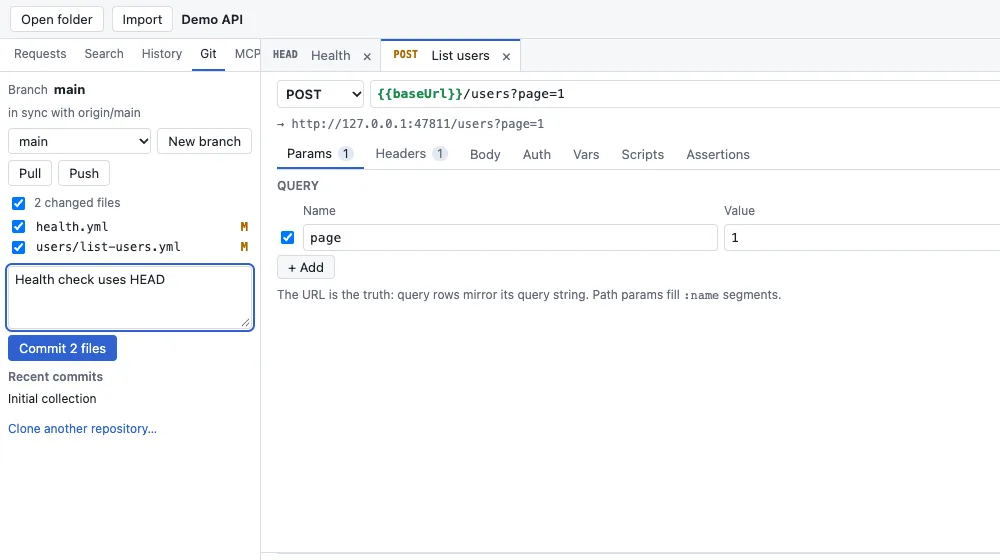
    Git sidebar with two ticked files, the commit message Health check uses HEAD, the Commit 2 files button and Recent commits below
  • Files and Git

    Import with a loss report

    Brings your requests over from Postman, Insomnia, OpenAPI, cURL, HAR or .http, and says honestly what did not come along.

    Six sources, one report per import with the request where something is missing. Scripts stay unchanged.

    In the app: File › ImportDocs: Import →

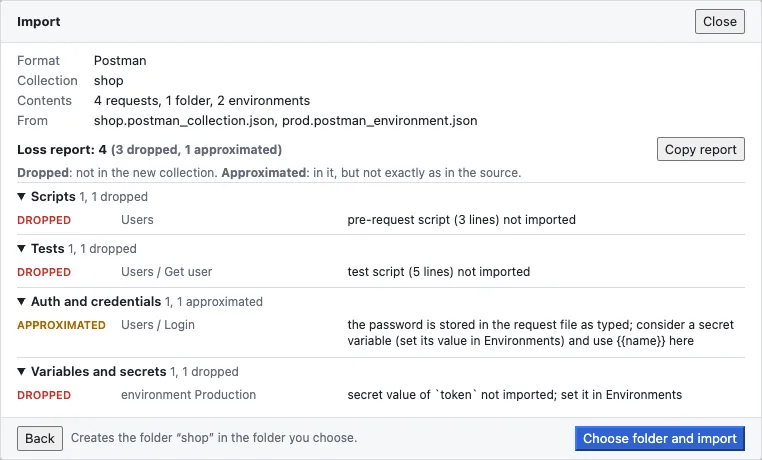
    Loss report of a Postman import of the collection shop with 4 requests, 1 folder, 2 environments, Loss report 4 (3 dropped, 1 approximated), grouped by Scripts, Tests, Auth and credentials and Variables and secrets
  • Sending, variables, auth

    Send with one keystroke

    Takes you straight back to the last request after start; one Mod+Enter and it is sent. Cold start and memory have fixed budgets.

    Cold start under 500 ms, under 150 MB when idle, sending in at most two keystrokes – measured as a release gate.

    In the app: Mod+EnterDocs: Sending requests →

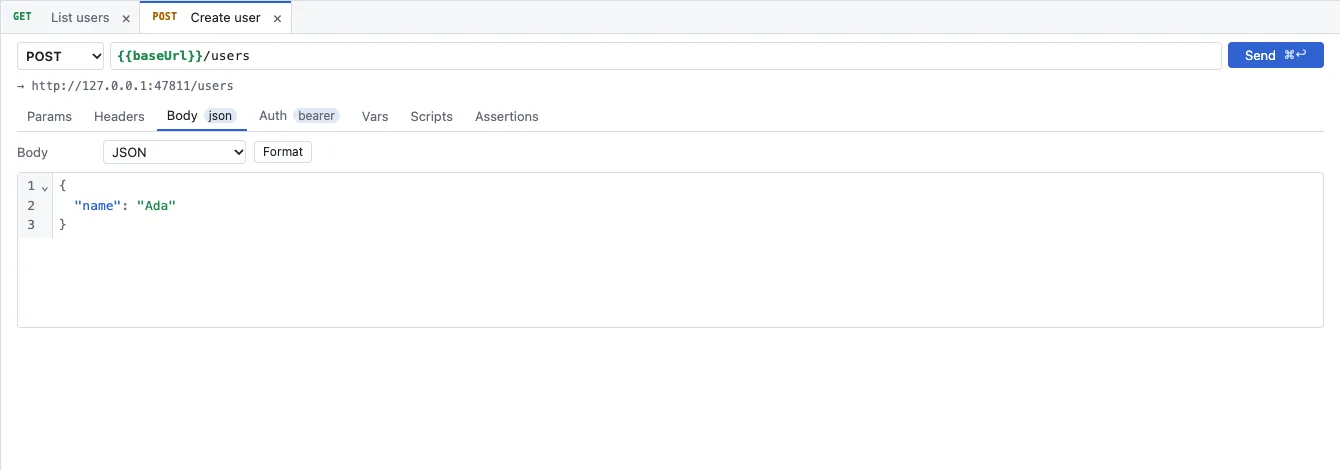
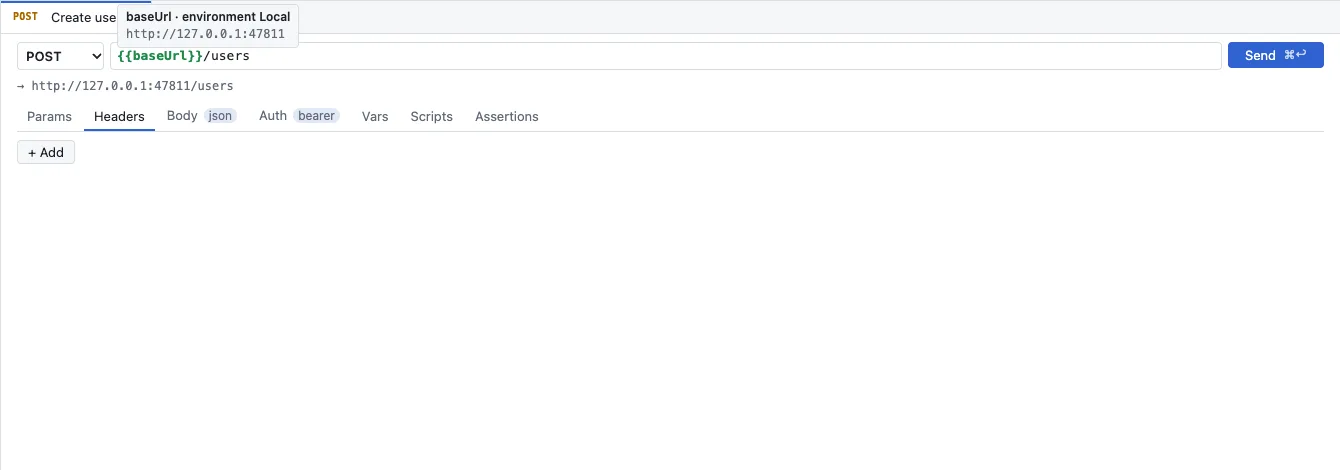
    Request editor with POST, URL baseUrl/users, the resolved address below, tabs Params, Headers, Body json, Auth bearer, Vars, Scripts, Assertions and a JSON body
  • Sending, variables, auth

    Large responses without stutter

    Shows even a 100 MB response smoothly instead of freezing the app. Bodies are formatted, highlighted and foldable.

    The response stays in the Rust core; the user interface only fetches the visible lines.

    Docs: Sending requests →

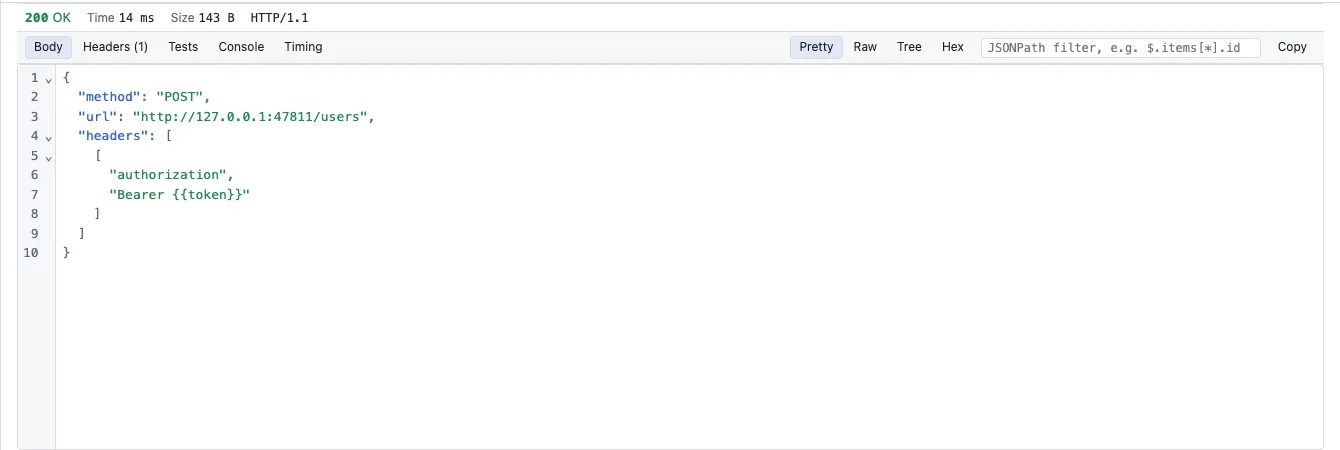
    Response with 200 OK, Time 14 ms, Size 143 B, HTTP/1.1, tabs Body, Headers, Tests, Console, Timing, views Pretty, Raw, Tree, Hex, a JSONPath filter and formatted JSON
  • Sending, variables, auth

    Variables with origin

    Answers “where does this value come from?” right at the value, instead of searching six dialogs.

    Six layers as in Bruno: global, collection, environment, folder, request, runtime.

    In the app: EnvironmentsDocs: Environments and variables →

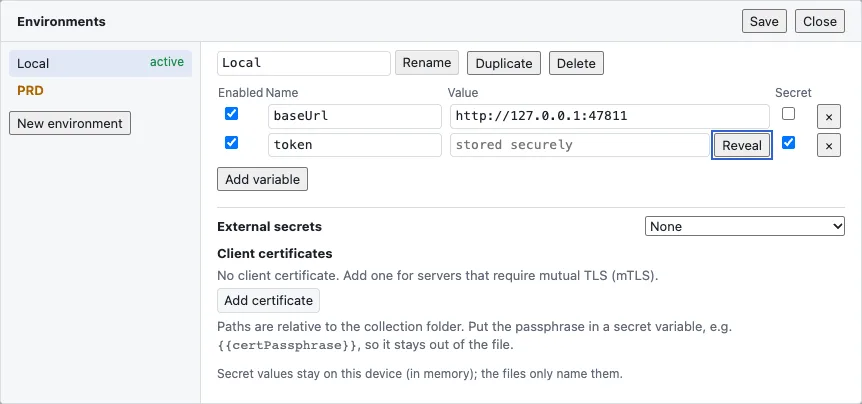
    Environments dialog with the environments Local (active) and PRD, variables baseUrl and token, token as a secret with stored securely and Reveal, below it External secrets and Client certificates
  • Sending, variables, auth

    Secrets in the keychain

    Lets you share collections without sharing passwords. The repo holds only the secret’s name; the value stays on your device or in your vault.

    The operating system’s keychain, encrypted on the web; external from 1Password, Vault, AWS, Azure and Google.

    In the app: Environments › SecretDocs: Environments and variables →

    Tooltip over the variable baseUrl in the URL with the text baseUrl, environment Local and the value http://127.0.0.1:47811
  • Sending, variables, auth

    OAuth 2.0, AWS SigV4, certificates

    Fetches and renews tokens itself, signs for AWS and authenticates with a client certificate – without a script before every request.

    Basic, bearer, API key; OAuth 2.0 with client credentials, password, authorization code with PKCE, device code, SAML 2.0 bearer.

    In the app: Request › AuthDocs: Authentication →

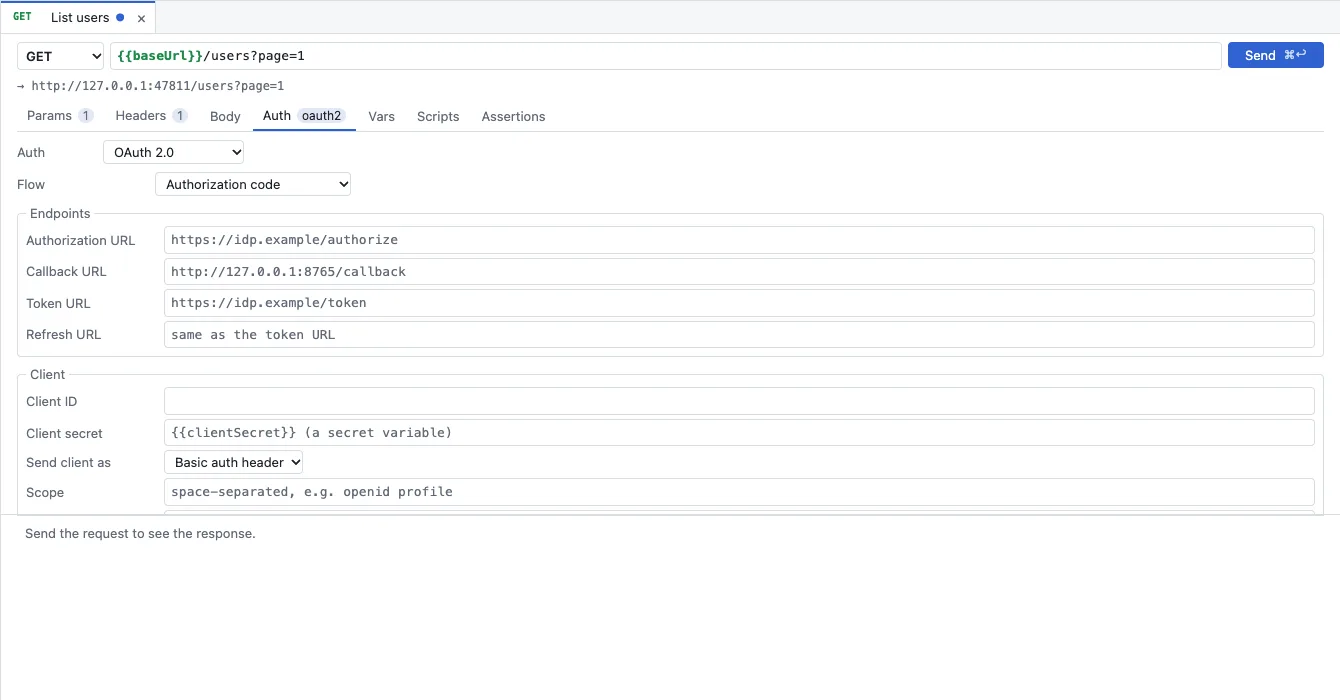
    Auth tab with OAuth 2.0 and the flow Authorization code, Endpoints with Authorization URL, Callback URL, Token URL and Refresh URL, below it Client with the client secret as a secret variable, Send client as and Scope
  • Tests and pipeline

    Scripts in a sandbox

    Lets scripts compute, set variables and test without touching files or the network. Someone else’s collection only runs once you trust it.

    QuickJS as WebAssembly, the same engine in app, browser and CLI. No file or network access except through the request API.

    In the app: Request › ScriptsDocs: Scripts, tests and runner →

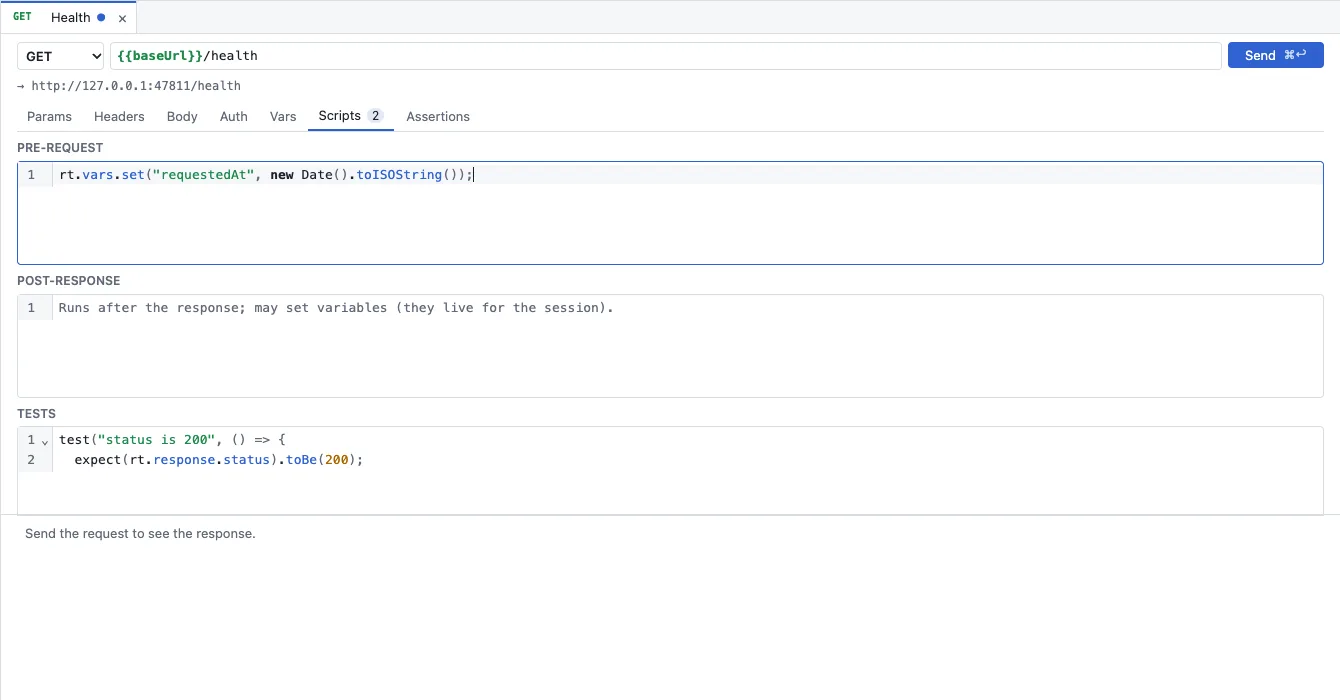
    Scripts tab of a GET request Health with three fields: PRE-REQUEST sets the variable requestedAt, POST-RESPONSE is empty, TESTS checks that the status is 200
  • Tests and pipeline

    pm.* and bru.* keep working

    Saves rewriting your Postman and Bruno scripts when you move. What does not work is named by a clear error and the loss report.

    Shims for bru, req, res, pm, postman and insomnia with a public coverage table.

    Docs: Scripts, tests and runner →

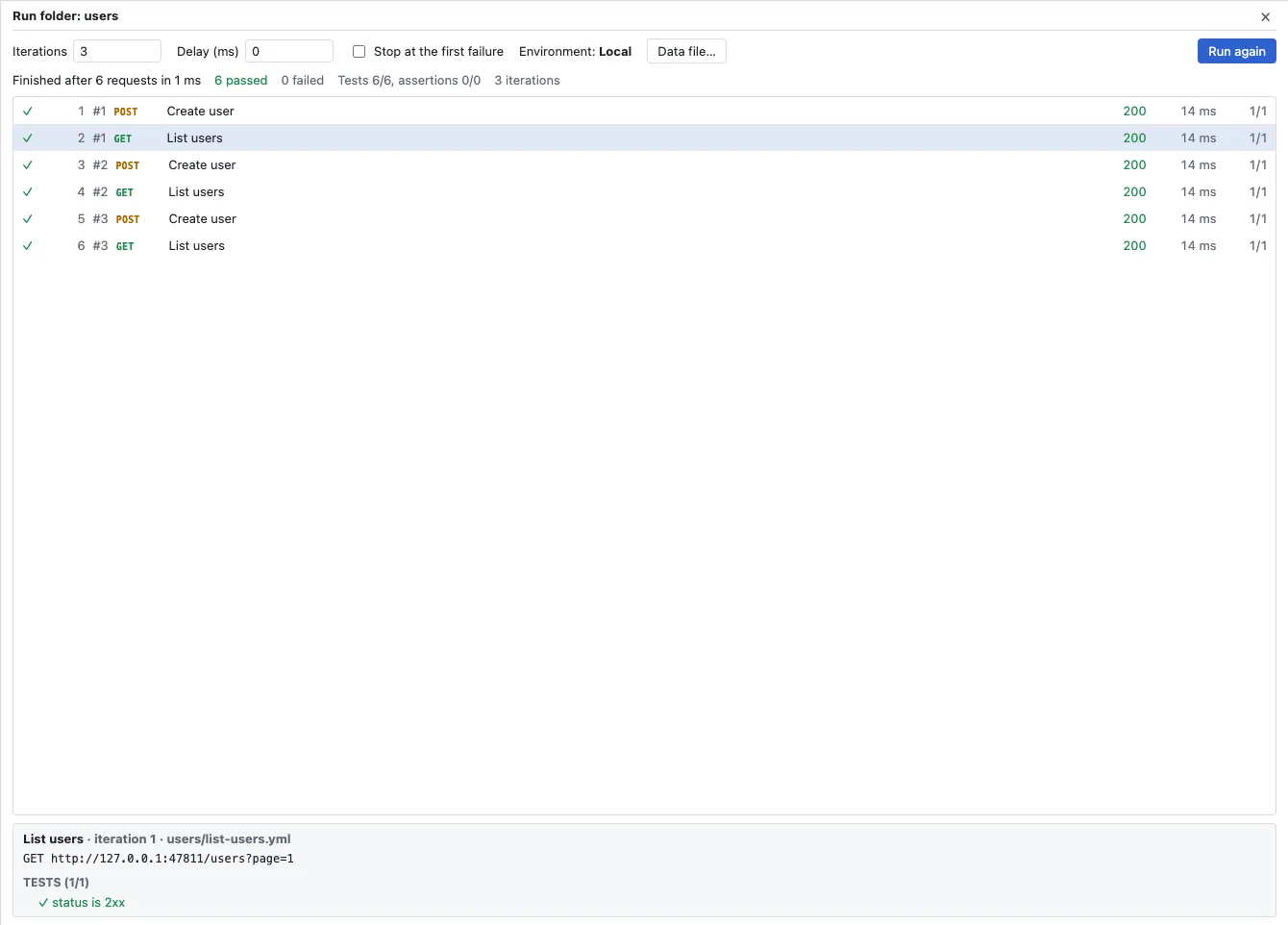
    Runner window Run folder: users with 3 iterations, delay 0, Stop at the first failure, environment Local and Data file; six green rows Create user and List users with status 200, below them the tests of the selected step
  • Tests and pipeline

    Assertions without JavaScript

    Checks status, headers and fields of a response in one line, also for everyone who does not want to write JavaScript.

    Assertions and variable actions right in the request; result in the report and in the pipeline.

    In the app: Request › AssertionsDocs: Scripts, tests and runner →

    Scripts tab of a GET request Health with three fields: PRE-REQUEST sets the variable requestedAt, POST-RESPONSE is empty, TESTS checks that the status is 200
  • Tests and pipeline

    Runner and rt run

    Runs a folder in the app and in the pipeline with the same core. If a test fails, the build fails.

    JUnit and JSON reports, exit code 4 for failed tests, GitHub Action and Docker image.

    In the app: Folder › RunDocs: rt command line →

  • Tests and pipeline

    rt mock and rt docs

    Gives the frontend an API before the backend is done, and the team documentation that comes from the same files.

    Mock server from saved examples; static HTML documentation without scripts and without secret values.

    Docs: rt command line →

  • gRPC, WebSocket, SSE, GraphQL

    gRPC

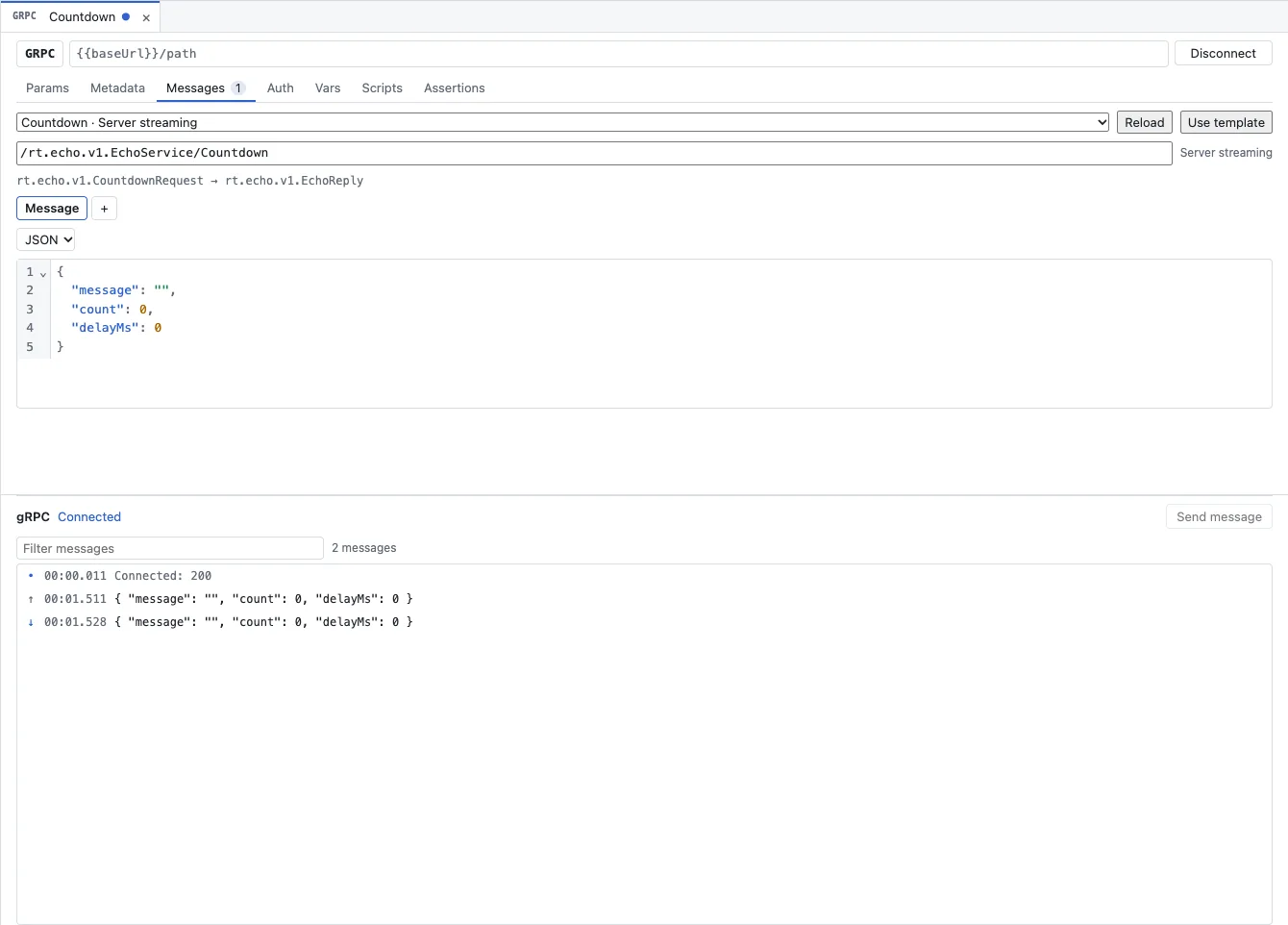
    Calls gRPC services without building your own client: write the message as JSON, send, read the answer as JSON.

    Unary and streaming, from .proto files or via server reflection; metadata as headers.

    Docs: gRPC, WebSocket, SSE and GraphQL →

    gRPC request Countdown with method GRPC, Messages tab, selected method Countdown · Server streaming, path /rt.echo.v1.EchoService/Countdown, a JSON message and below it the history with Connected: 200, one sent and one received message
  • gRPC, WebSocket, SSE, GraphQL

    WebSocket

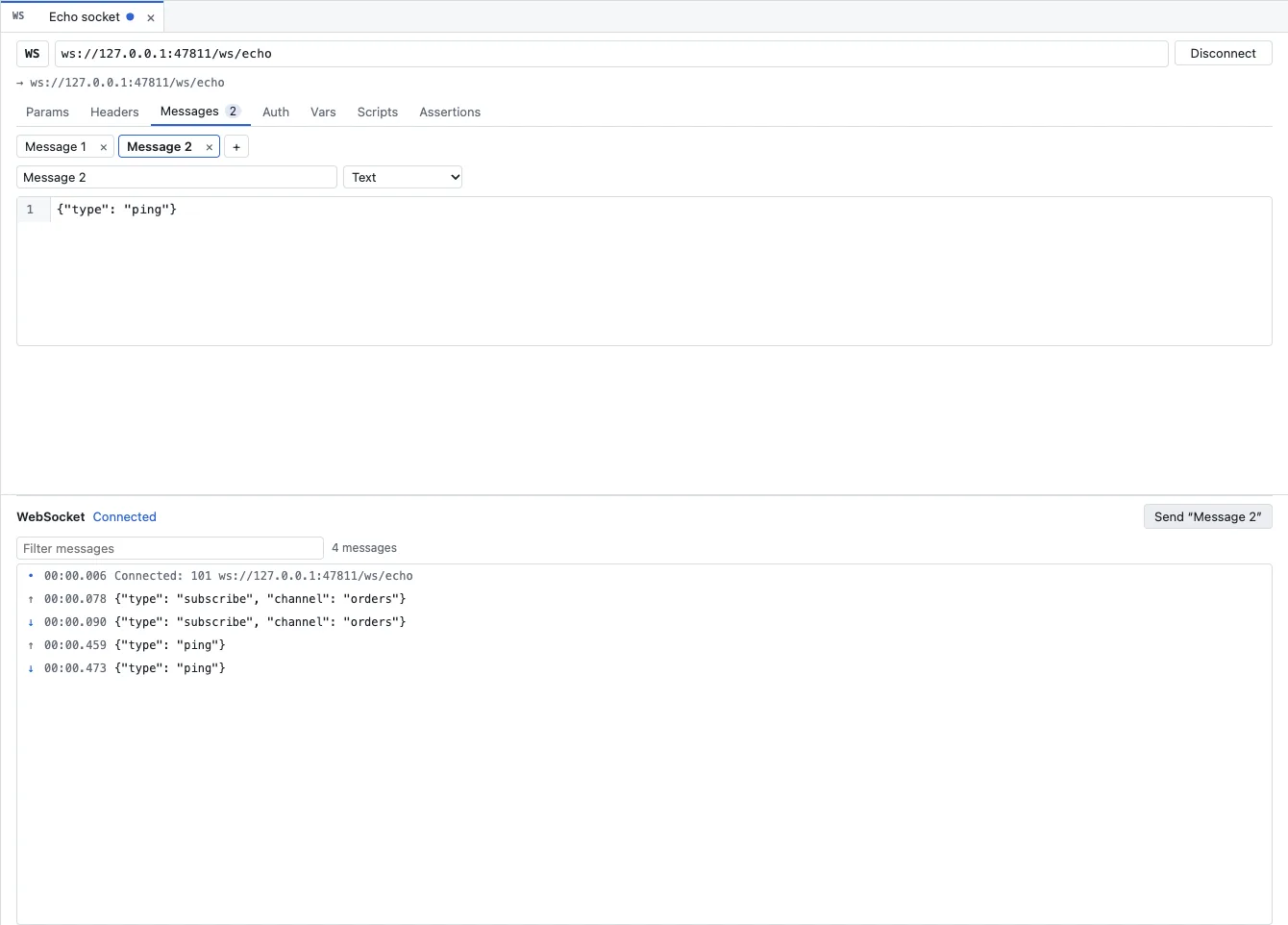
    Connects to a WebSocket, sends saved messages and shows every frame in the order it arrived.

    Session log with masked secret values; in the web app through the companion.

    Docs: gRPC, WebSocket, SSE and GraphQL →

    WebSocket request Echo socket with method WS and URL ws://127.0.0.1:47811/ws/echo, Messages tab with Message 1 and Message 2 in Text format, below it the history with Connected: 101 and two sent and two received messages
  • gRPC, WebSocket, SSE, GraphQL

    Server-sent events

    Shows a text/event-stream response as a list of events while they arrive – for example the streams of AI APIs.

    A normal HTTP request; the view switches by itself for text/event-stream.

    Docs: gRPC, WebSocket, SSE and GraphQL →

    gRPC request Countdown with method GRPC, Messages tab, selected method Countdown · Server streaming, path /rt.echo.v1.EchoService/Countdown, a JSON message and below it the history with Connected: 200, one sent and one received message
  • gRPC, WebSocket, SSE, GraphQL

    GraphQL

    Writes the query and the variables separately instead of building JSON with embedded query text by hand.

    A body with query and variables, sent as JSON; variables and auth as with every request.

    Docs: gRPC, WebSocket, SSE and GraphQL →

    gRPC request Countdown with method GRPC, Messages tab, selected method Countdown · Server streaming, path /rt.echo.v1.EchoService/Countdown, a JSON message and below it the history with Connected: 200, one sent and one received message
  • AI agents and MCP

    MCP server rt mcp

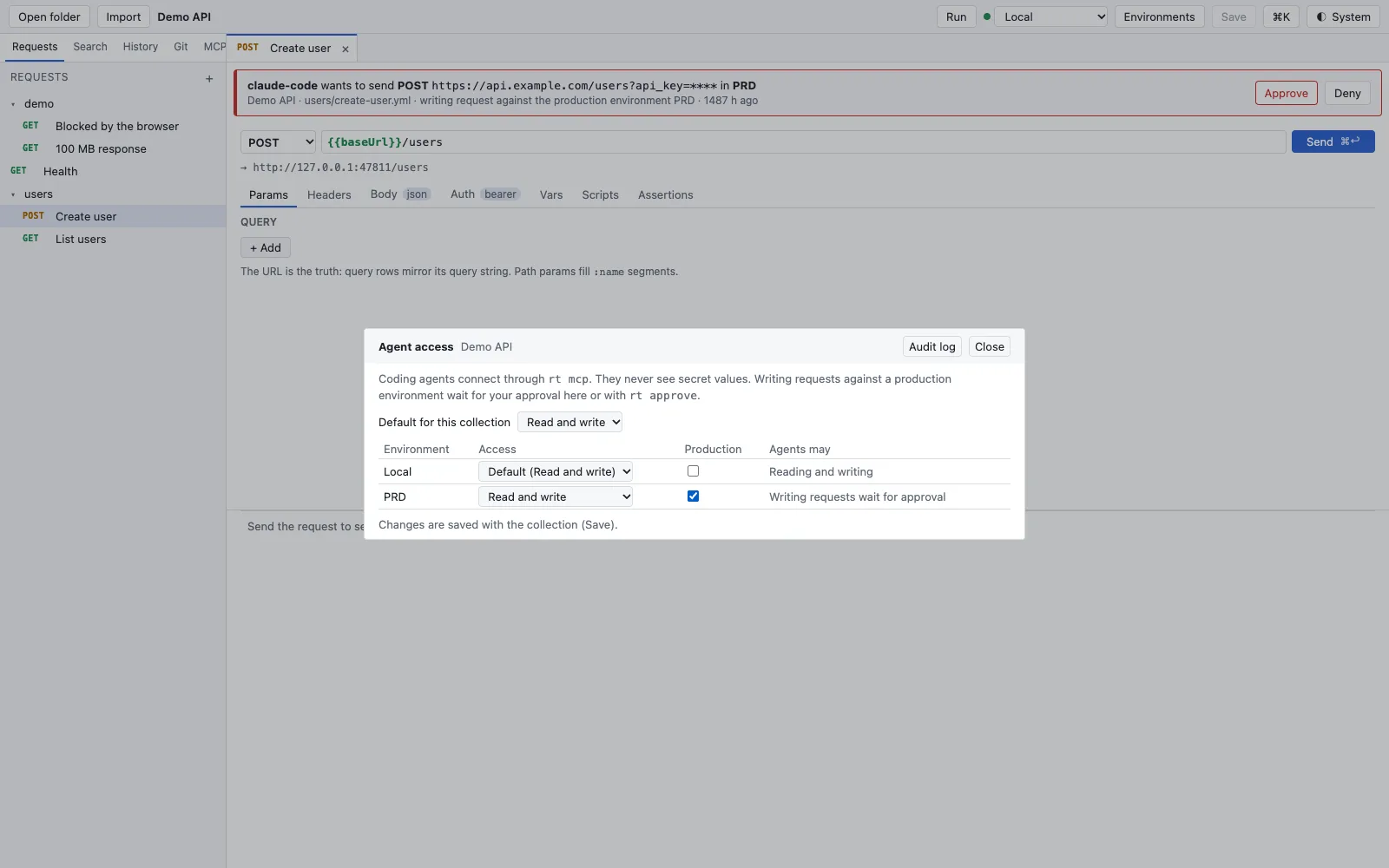
    Gives coding agents your collections as tools: list requests, read them, send them and run a folder – with the same core and the same reports as the app.

    Five tools over stdio; a rule per environment (nothing, read, write), read-only by default.

    Docs: AI agents and MCP server →

    Agent access dialog of the collection Demo API: Default for this collection Read and write, environment Local with Default, environment PRD with Read and write and Production ticked, column Agents may with Writing requests wait for approval; an approval banner above
  • AI agents and MCP

    Approval for writes to production

    Lets an agent read without changing anything in production before you have seen it. Every call is in the local audit log.

    Approve in the app’s banner or with rt approve and rt deny; agents never see secret values.

    In the app: “Approval” bannerDocs: AI agents and MCP server →

    Agent access dialog of the collection Demo API: Default for this collection Read and write, environment Local with Default, environment PRD with Read and write and Production ticked, column Agents may with Writing requests wait for approval; an approval banner above
  • AI agents and MCP

    MCP client with tests

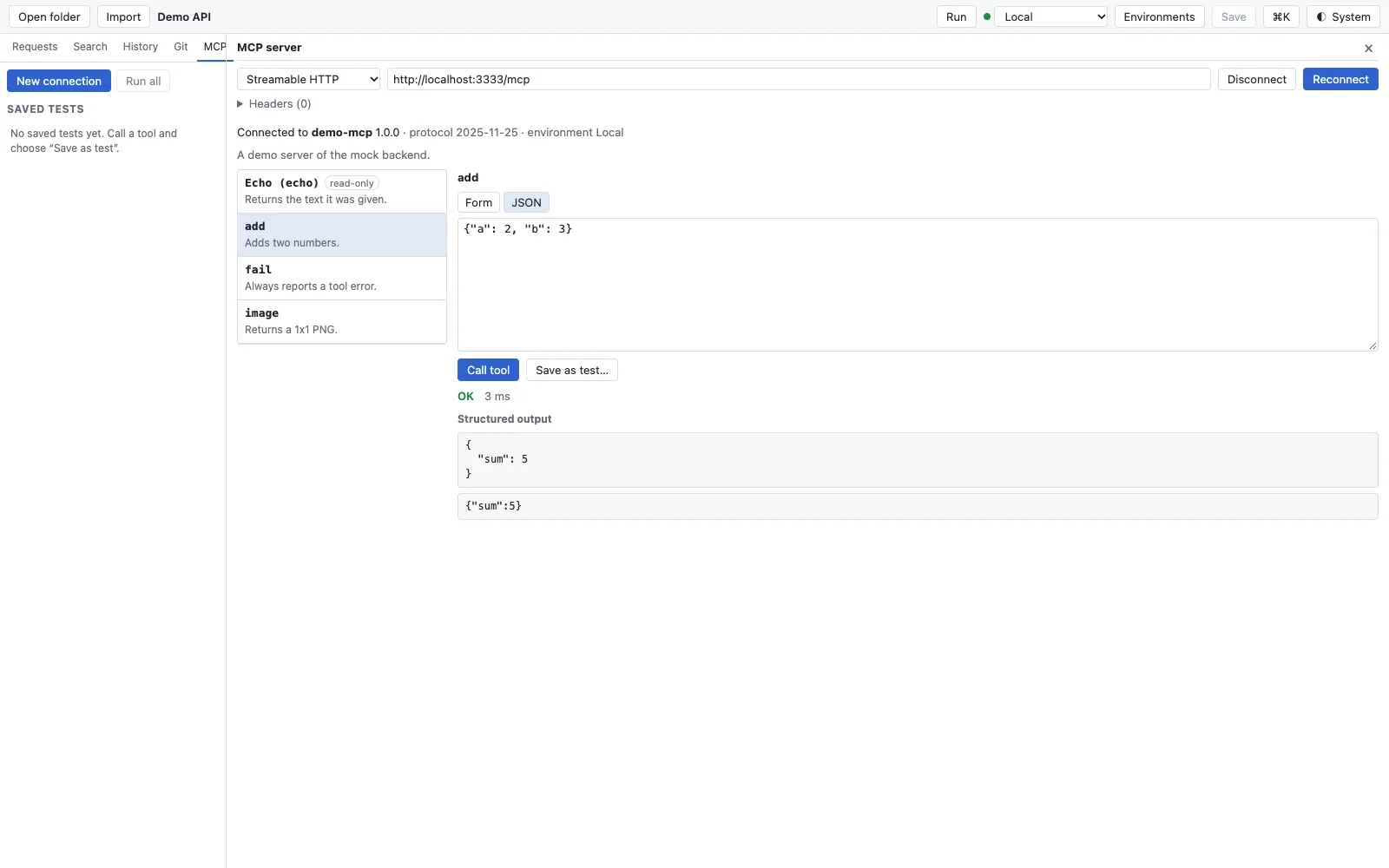
    Tests your own MCP server like an API: call a tool, check the answer, save it as a test and repeat it in the pipeline.

    stdio and Streamable HTTP; tests as *.mcp.yaml next to the collection, rt mcp-test.

    Docs: MCP client →

    MCP client connected to demo-mcp 1.0.0 over Streamable HTTP at http://localhost:3333/mcp, protocol 2025-11-25, environment Local; on the left the tools echo (read-only), add, fail and image, on the right the tool add with JSON arguments, Call tool, Save as test… and the result OK with sum 5
  • AI agents and MCP

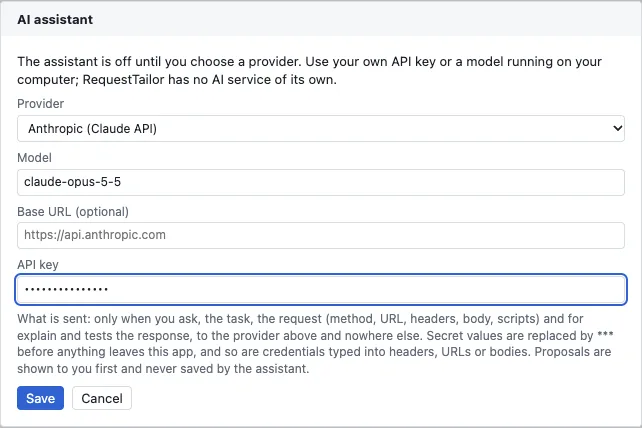
    AI assistant with your own key

    Creates a request from a description, explains a response and suggests tests – with the model you choose, also a local one.

    Off until set up; Anthropic or OpenAI-compatible. Secret values are removed before sending.

    In the app: Settings › AIDocs: AI assistant →

    AI assistant dialog with provider Anthropic (Claude API), model, optional base URL, a masked API key and the note on what is sent; Save and Cancel buttons
  • OData and SAP

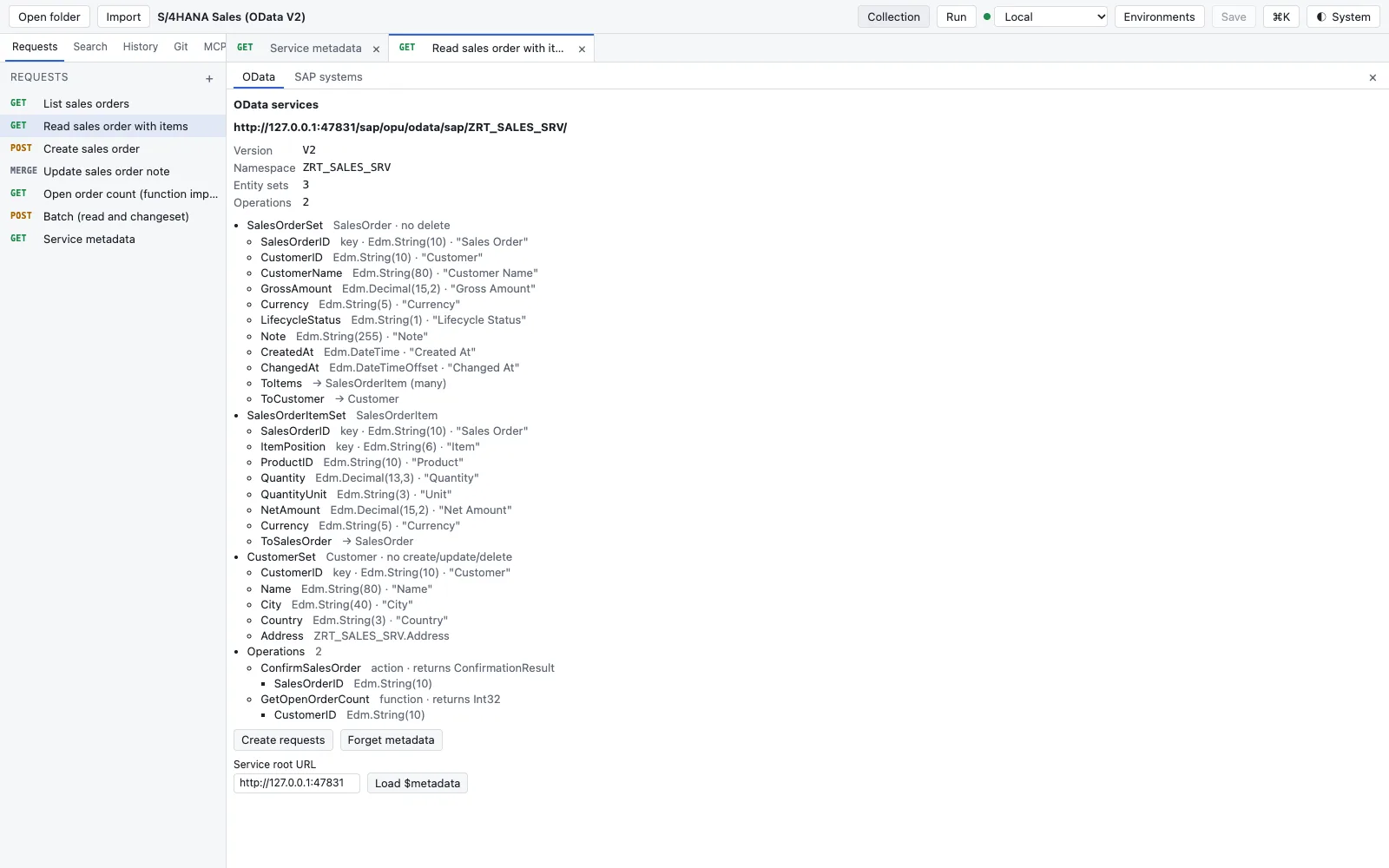
    OData plugin: entities and query builder

    Reads $metadata and builds queries without you having to know field names and $filter syntax by heart.

    Entities, properties, navigations; $filter, $select, $expand, $orderby, $top, $skip and $count.

    In the app: “OData” tabDocs: OData and SAP →

    Collection tab OData of the service ZRT_SALES_SRV, version V2: entity sets SalesOrderSet, SalesOrderItemSet and CustomerSet with keys, Edm types and labels, navigation ToItems and ToCustomer, two operations and the buttons Create requests, Forget metadata and Load $metadata
  • OData and SAP

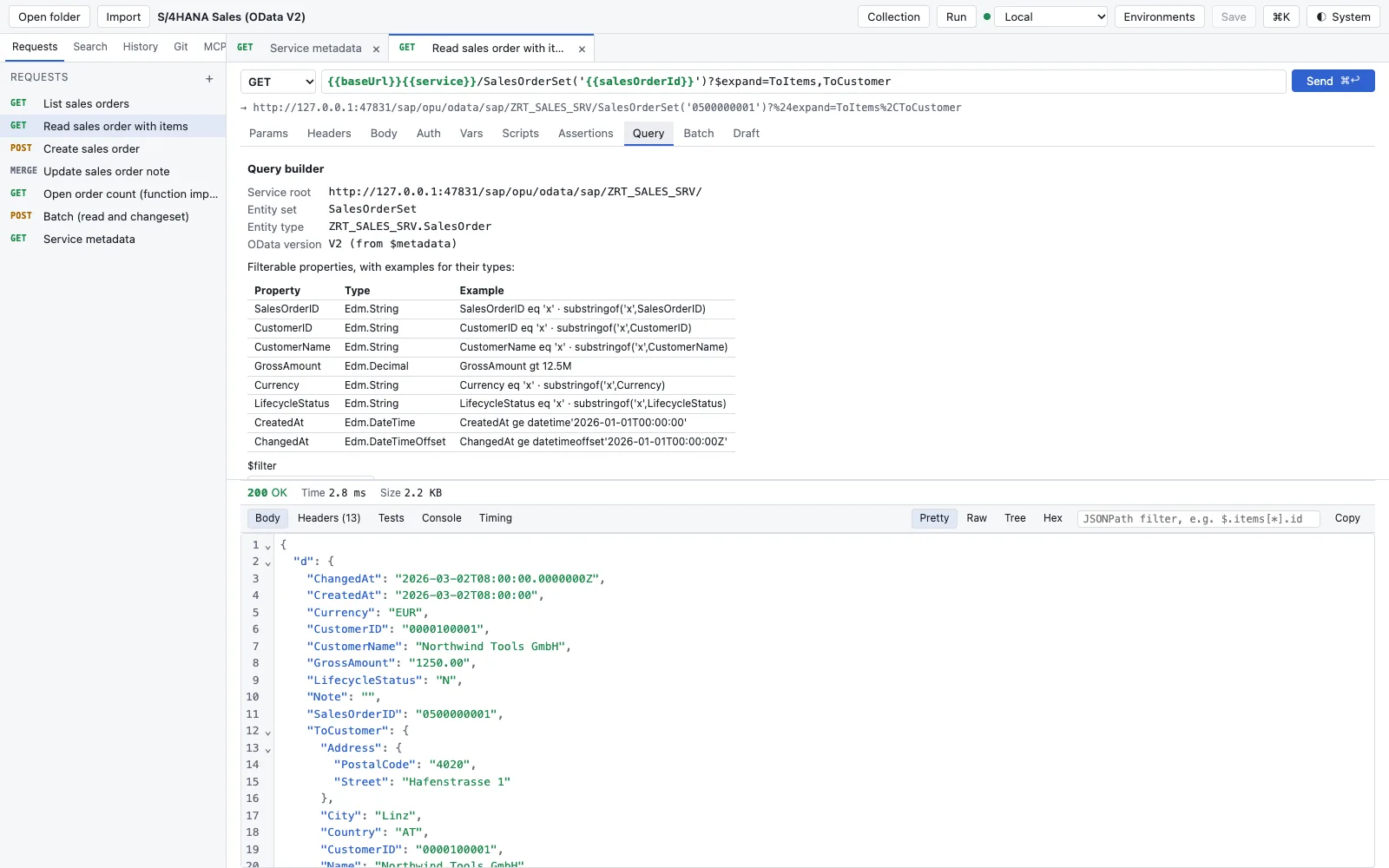
    CSRF, ETag, $batch and drafts

    Takes care of the steps where writing requests against SAP usually fail: fetch the token, set If-Match, build the batch, activate the draft.

    CSRF token automatically, If-Match from the ETag, $batch editor, draft flow for RAP and CAP.

    Docs: OData and SAP →

    Query tab of the request Read sales order with items: service root, entity set SalesOrderSet, OData version V2 from $metadata, a table of filterable properties with type and example filter, below it the response 200 OK with the order including ToCustomer
  • OData and SAP

    DEV, QAS and PRD with sap-client

    Creates an environment for every system of your landscape so that the same request runs against DEV, QAS and PRD.

    Environments with sap-client; secrets without a value until you enter them.

    Docs: OData and SAP →

    Collection tab OData of the service ZRT_SALES_SRV, version V2: entity sets SalesOrderSet, SalesOrderItemSet and CustomerSet with keys, Edm types and labels, navigation ToItems and ToCustomer, two operations and the buttons Create requests, Forget metadata and Load $metadata
  • OData and SAP

    Plugins as WebAssembly

    Extends RequestTailor with your own protocols and domain knowledge without a plugin reaching your files or secrets.

    One .wasm file with a manifest; you see the permissions before installing. Public, versioned API.

    In the app: Settings › PluginsDocs: Plugins →

  • Team and Enterprise

    Sharing through Git

    Shares collections through the repository you already have: branch, review, merge. That needs no paid edition, not even in a team.

    Everything a team can do locally through Git is Free and stays Free.

    Docs: Git →

    Git sidebar with branch main, in sync with origin/main, two changed files health.yml and users/list-users.yml, above it a diff of health.yml where the method changes from GET to HEAD

ProIn the works For everyone who works on several devices.

  • Files and Git

    Sync between your devicesIn the works

    Keeps settings, history and local collections in step on Mac, laptop and in the browser, without CloudDNA being able to read them.

    End-to-end encrypted. Planned; Git stays the way for collections in a team.

    Docs: Licence and editions →

  • AI agents and MCP

    AI quota without your own keyIn the works

    For everyone who does not want to, or may not, set up their own key.

    Planned. Your own key stays in Free.

    Docs: AI assistant →

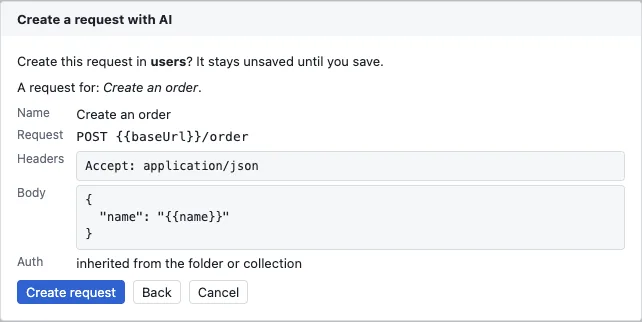
    Create a request with AI dialog: Create this request in users? It stays unsaved until you save. Name Create an order, request POST {baseUrl}/order, header Accept: application/json, a JSON body with name, auth inherited from the folder or collection; buttons Create request, Back and Cancel
  • OData and SAP

    BTP service keys and destinationsIn the works

    Turns an SAP BTP service key and your destinations into ready environments with OAuth.

    Planned. The OData basics stay in Free.

    Docs: OData and SAP →

    Collection tab OData of the service ZRT_SALES_SRV, version V2: entity sets SalesOrderSet, SalesOrderItemSet and CustomerSet with keys, Edm types and labels, navigation ToItems and ToCustomer, two operations and the buttons Create requests, Forget metadata and Load $metadata

TeamIn the works Everything in Pro, plus shared workspaces.

  • Sending, variables, auth

    Shared vault for the teamIn the works

    Gives new colleagues the secrets of an environment without sending them in a chat.

    Planned. Until then: the keychain per device or an external vault such as 1Password or Vault.

    Docs: Licence and editions →

  • Team and Enterprise

    Real-time workspacesIn the works

    Lets several people work on the same collection at the same time and see who changes what.

    Planned, with roles for reading and writing.

    Docs: Licence and editions →

  • Team and Enterprise

    RolesIn the works

    Decides who may read, change or manage in a shared workspace.

    Planned.

    Docs: Licence and editions →

EnterpriseIn the works Everything in Team, plus corporate IT.

  • Team and Enterprise

    SSO and SCIMIn the works

    Signs users in through your identity provider and provisions them from there.

    Planned.

    Docs: Licence and editions →

  • Team and Enterprise

    Audit export and policiesIn the works

    Gives corporate IT the audit log and central rules, for example which environments count as production.

    Planned. The local audit log of agent calls is already in Free.

    Docs: Secrets and privacy →

  • Team and Enterprise

    Self-hosting and air gapIn the works

    For networks without internet: everything in your own data centre, the licence as a file.

    Planned.

    Docs: Licence and editions →

Buying, when the time comes

Bought on the website. No account in the app.

Buying is meant to run through the checkout of the Tailor-Plattform, as for the other Tailors. Until Pro and Team are out, the button leads to an enquiry.

  1. Get Free. No key, no account, no expiry.
  2. A trial licence for Pro or Team. The key comes once the edition's first feature is out.
  3. Edition, billing, quantity. Monthly or yearly, for one or more users.
  4. Enterprise and framework agreements. Write to us – on request.

Buy directly

RequestTailor

Total, net , excl. VAT

You pay on Stripe. The invoice uses reverse charge if you enter a VAT ID. We send you the licence key and the invoice by e-mail after payment.

Our terms and licence terms apply.

Newsletter and product information

Optional and not needed for the purchase. More in the privacy policy.

As a customer, you will occasionally receive information about similar products from CloudDNA in your licence and subscription e-mails. You can object to this at any time free of charge – via the link in each of these e-mails or right here:

Sources on this page

The superscript numbers in the text point here. Tap one to see the source right where it is used; all sources of this website are listed on one page.

  1. 1

    Core under Apache 2.0, without paid features ↑Product · RequestTailor core repository, CLAUDE.md (Lizenzgrenze), LICENSE, TRADEMARKS.md · checked on 2026-11-22

  2. 2

    Free, Pro, Team and Enterprise editions (concept) ↑Product · RequestTailor product concept (internal), section “Editions and prices” · checked on 2026-11-22

  3. 3

    No account, offline, no connection to CloudDNA ↑Product · RequestTailor core repository, CLAUDE.md (Produktprinzipien 2 und 7), website/docs/privacy · checked on 2026-11-22

  4. 4

    Requests as OpenCollection YAML, one file per request ↑Product · RequestTailor core repository, CLAUDE.md (Produktprinzip „Dateien sind die Wahrheit“), crates/rt-format, website/docs/collections · checked on 2026-11-22

  5. 5

    Byte-identical round trip, 86 Bruno collections ↑Product · RequestTailor core repository, testdata/collections/bruno, crates/rt-format (Round-Trip-Tests) · checked on 2026-11-22

  6. 6

    Git in the app, without a staging area ↑Product · RequestTailor core repository, crates/rt-git (gitoxide), CLAUDE.md (App, Welle 4) · checked on 2026-11-22

  7. 7

    Secret scanner before every commit ↑Product · RequestTailor core repository, crates/rt-app (secret_scan), crates/rt-cli/README.md (rt scan) · checked on 2026-11-22

  8. 8

    Import from six sources with a loss report ↑Product · RequestTailor core repository, crates/rt-format/src/import, testdata/import/SOURCES.md · checked on 2026-11-22

  9. 9

    Performance budgets as release gates ↑Product · RequestTailor core repository, perf/budgets.toml, perf/README.md · checked on 2026-11-22

  10. 10

    Large responses stay in the core ↑Product · RequestTailor core repository, CLAUDE.md (App, ResponseStore), perf/README.md · checked on 2026-11-22

  11. 11

    Variables in six layers with origin ↑Product · RequestTailor core repository, crates/rt-core (vars::Scope), website/docs/environments · checked on 2026-11-22

  12. 12

    Secrets in the keychain and from external vaults ↑Product · RequestTailor core repository, CLAUDE.md (Produktprinzip 3), crates/rt-cli/README.md (externe Secrets), website/docs/environments · checked on 2026-11-22

  13. 13

    OAuth 2.0, AWS SigV4, client certificates ↑Product · RequestTailor core repository, crates/rt-core (model::auth), crates/rt-format/src/auth, testdata/sigv4 · checked on 2026-11-22

  14. 14

    Script sandbox: QuickJS in WebAssembly ↑Product · RequestTailor core repository, crates/rt-script (api.d.ts, README) · checked on 2026-11-22

  15. 15

    Shims for bru.*, pm.* and insomnia ↑Product · RequestTailor core repository, crates/rt-script/SHIM-COVERAGE.md · checked on 2026-11-22

  16. 16

    Runner, rt run, JUnit and JSON, exit code 4 ↑Product · RequestTailor core repository, crates/rt-core (runner, assert), crates/rt-cli/README.md (Exit codes) · checked on 2026-11-22

  17. 17

    rt mock and rt docs ↑Product · RequestTailor core repository, crates/rt-cli/src/mock.rs und docs.rs, launch/wave8/RELEASE-NOTES.md · checked on 2026-11-22

  18. 18

    gRPC, WebSocket, SSE and GraphQL ↑Product · RequestTailor core repository, crates/rt-core (stream), crates/rt-grpc, launch/wave8/RELEASE-NOTES.md · checked on 2026-11-22

  19. 19

    MCP server rt mcp with rules per environment ↑Product · RequestTailor core repository, crates/rt-cli/src/mcp, crates/rt-cli/README.md (MCP server), crates/rt-cli/tests/gate_w8.rs · checked on 2026-11-22

  20. 20

    MCP client with saved tests ↑Product · RequestTailor core repository, crates/rt-app (mcp_client), crates/rt-cli/src/mcp_test.rs · checked on 2026-11-22

  21. 21

    AI assistant, off until configured ↑Product · RequestTailor core repository, crates/rt-app (ai), website/docs/privacy · checked on 2026-11-22

  22. 22

    OData plugin for S/4HANA, CAP and RAP ↑Product · RequestTailor core repository, plugins/odata, website/sap, website/docs/odata · checked on 2026-11-22

  23. 23

    Plugins only as WebAssembly, with permissions ↑Product · RequestTailor core repository, crates/rt-plugin/API.md, plugins/README.md · checked on 2026-11-22
Frequently asked

Questions about the editions.

What is included in Free?
Everything RequestTailor can do today: requests as files, Git, import with a loss report, variables and secrets, OAuth 2.0, AWS SigV4 and client certificates, gRPC, WebSocket, SSE and GraphQL, scripts, tests and the runner, rt for the pipeline, MCP server and MCP client, the AI assistant with your own key, plugins and the OData basics. Free is open source under Apache 2.0 and needs no account.
Can I buy Pro or Team already?
Not yet. Pro, Team and Enterprise are in the works. The prices on this page are set. Until then, the buy button leads to an enquiry; we get in touch once the edition's first feature is out. You can already note a trial licence.
What does Pro cost?
Pro costs €7 per user and month, or €69 per user and year, excl. VAT On a yearly plan that equals €5.75 per month. All prices net plus VAT.
What is the difference between Pro and Team?
Pro is for you alone: end-to-end encrypted sync between your devices, a managed AI quota and SAP comfort such as BTP service keys and destinations. Team adds what working together needs: real-time workspaces, roles and a shared vault. Team costs €14 per user and month, or €138 per user and year, excl. VAT
What is Enterprise?
For companies with their own requirements: SSO and SCIM, audit export, policies, self-hosting and a licence file for networks without internet access. Enterprise is available on request. Enterprise is in the works too.
What is the fairness guarantee?
What is free once never moves behind a paywall. Paid editions only come with new features; the core stays open source under Apache 2.0 and contains no licence check.
Do I need a licence key for Free?
No. Free has no key, no account and no expiry. Only Pro, Team and Enterprise need a key, once they exist.

Your question isn’t here? Talk to me: +43 664 1964199 office@clouddna.at Get in touch

Contact

Requests in the repo instead of an account? Talk to us.

Free is free and stays free. For an early copy, for Enterprise, for the OData plugin on your SAP system or for a wish for Pro and Team: write to me. I reply within one working day, personally.

Martin KochManaging Director, CloudDNAI read every request myself and reply personally.