gRPC, WebSocket, SSE and GraphQL
Besides HTTP, RequestTailor speaks gRPC, WebSocket, server-sent events and GraphQL1. Each of these requests is a file in the collection like any other, uses the same variables, auth and plugins and runs on the Mac, in the web app and with rt send. Secret values are masked in the message history, received messages included.
- Edition
- Free
- Method
GRPCandWSnext to the HTTP methods- gRPC
- unary and streaming, .proto or server reflection
- In the browser
- sessions through the
rt agentcompanion - Command line
rt send, for SSE with--sse
Sessions instead of single responses
gRPC, WebSocket and SSE are sessions: instead of Send, the request shows a button to connect, then Disconnect. Preparation is the same as for a send – variables, auth including OAuth 2.0, plugins, cookies and pre-request scripts – and then the connection opens. The message history appears below:
- one row per event with the time since connecting: connected (with the handshake or response head), sent (↑), received (↓), closed or error;
- Filter messages searches the history; clicking a row shows the message formatted and ready to copy;
- the list is virtual: long histories stay smooth, and while you are at the end it keeps scrolling with new messages.
The request’s headers are the handshake headers for WebSocket and the metadata for gRPC (Metadata tab).
gRPC
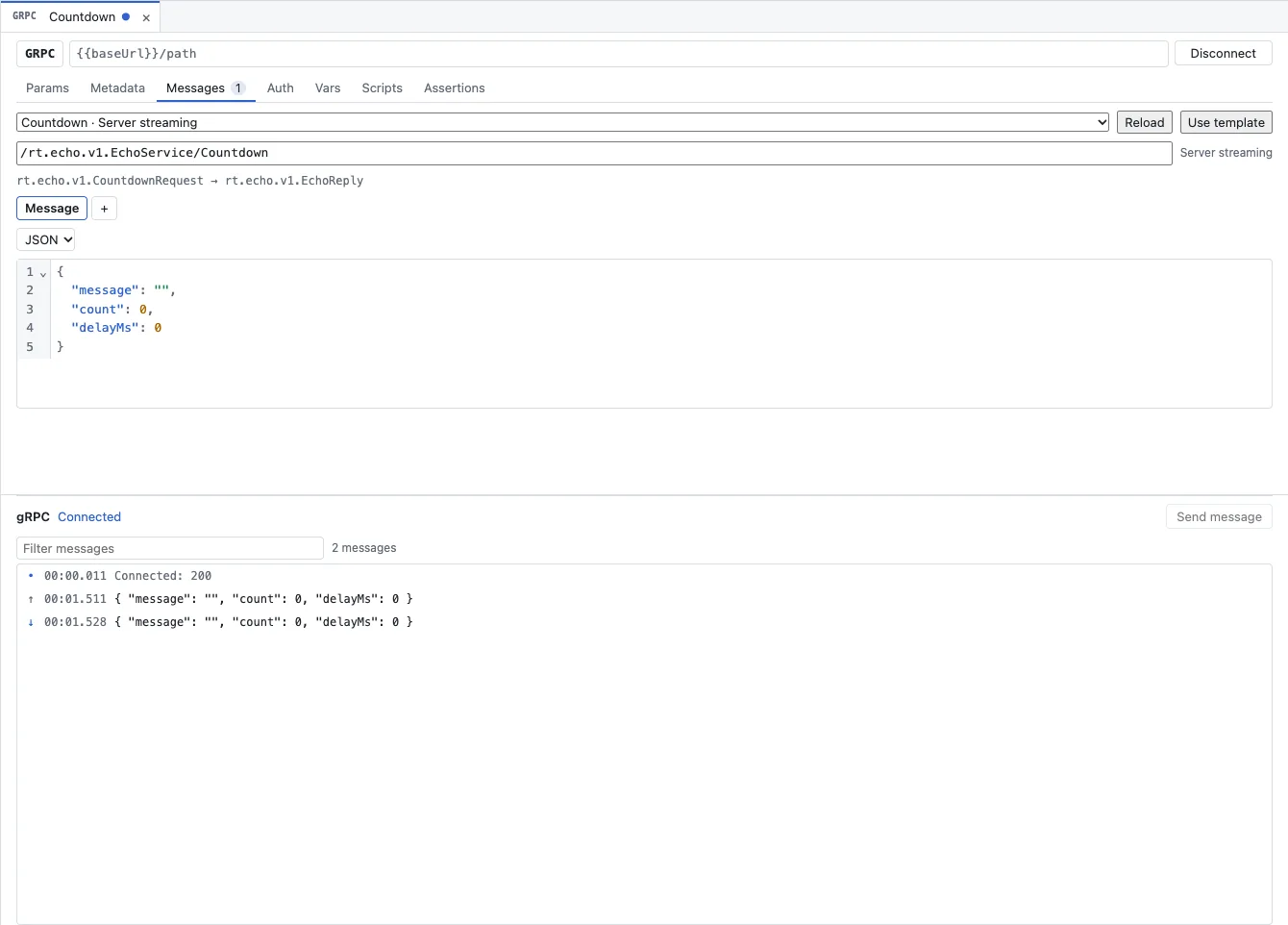
- You pick the method from the list of services; next to it is its kind (unary, server, client or bidirectional streaming).
- Use template fills the message with a JSON skeleton of the input message, Reload loads the services again.
- You write messages as JSON. RequestTailor encodes them as protobuf and shows received messages as JSON again.
The services come from one of three sources:
- the request’s
.protofile, - the collection’s
.protofiles and import paths (config.protobufinopencollection.yml), - or the service’s server reflection (
grpc.reflection.v1, falling back tov1alpha) when there is no file.
- Create a new request and choose
GRPCas the method; put the service address into the URL, ideally with a variable. - In the Messages tab, pick the method from the list and click Use template.
- Fill in the fields of the JSON. Metadata such as a token goes into the Metadata tab, sign-in into Auth.
- Connect. For unary calls and server streaming, the message is sent as soon as the connection is up; for client and bidirectional streaming you send more messages with Send message and finish the stream with End stream.
Request files stay OpenCollection items of type grpc, as Bruno writes them.
WebSocket
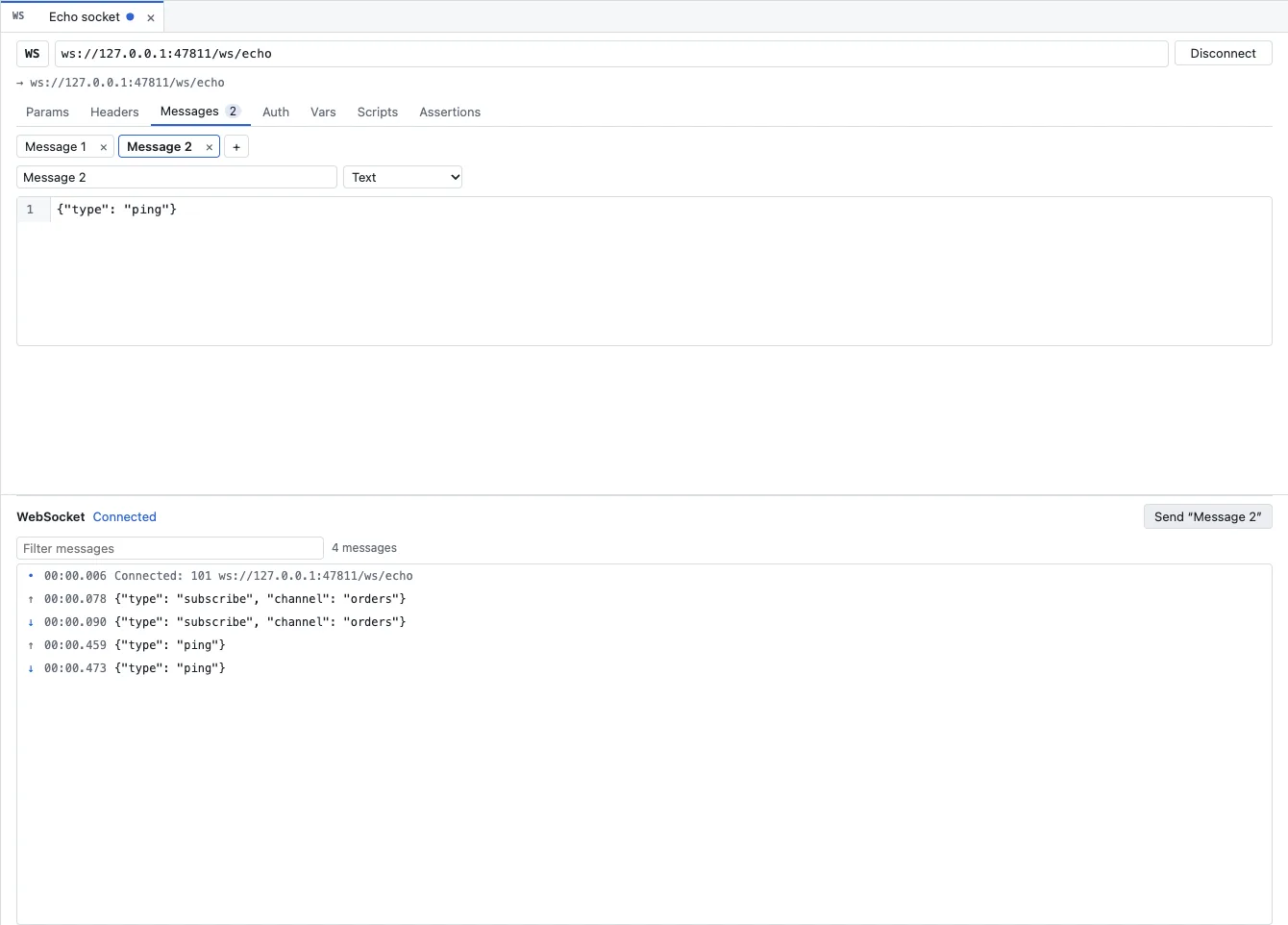
- Create a request with the method
WSand enter thews://orwss://address. - In the Messages tab, add messages with + and give each a name and a format (text or binary). They are saved with the request.
- Connect. The selected message goes out once the connection is open; the Send “…” button on the right above the history sends more.
- Disconnect closes the connection; the history shows the code and reason.
Server-sent events
SSE is an ordinary HTTP request. As soon as it has an enabled Accept: text/event-stream header, RequestTailor opens it as a session and shows each event as a row of its own, with the event’s name and ID. Without the header it stays a normal request with one response.
GraphQL
GraphQL is HTTP with a body type of its own: Query and Variables (JSON), sent as JSON. The editor fetches the schema by introspection – sent like the request itself, with its auth – and keeps it per URL and environment until you refresh it. That gives completion and validation of the query against the schema, and a searchable schema browser with types, fields, arguments, descriptions and deprecations. Without a schema the editor still works, just unchecked.
For AI agents, a GraphQL query counts as reading as long as it contains no mutation (see Reading or writing).
In the web app: through the companion
A browser can neither send gRPC over HTTP/2 nor arbitrary WebSocket headers by itself. In the web app, every session therefore runs through the rt agent companion on your machine, which opens it with the same native core and passes the events back to the browser. How to start and pair it is in Companion rt agent.
Sessions with rt send
rt send ws/echo.yml --env Local --message "Message 2" --duration 5
rt send grpc/countdown.yml --until-close
rt send events/stream.yml --sse --duration 30
rt send opens the session, sends the selected message (or the one named with --message) and by default closes after the first received message or after 10 seconds. --duration SECONDS keeps it open that long, --until-close until the server ends it. The output is the masked history as JSON. Exit code 0 when the session was open, 1 for a transport error, 2 when the request or the message is not found, 3 when the request could not be prepared.
See also
- Features at a glance Features · Protocols
- Docs Companion rt agent
- Docs Sending requests
- Docs Authentication
- Sources CLAUDE.md1 · rt-cli/README.md2