Import
An import creates a new collection folder from another tool’s export. What cannot be carried over exactly, RequestTailor does not hide: every import ends with a loss report that says what is missing or only approximated – and where.
- Edition
- Free
- Sources
- Postman, Insomnia, OpenAPI, cURL, HAR, .http
- Result
- a new collection folder
- Report
- every loss with location and effect
- Command line
rt import
What you can import
| Source | Versions |
|---|---|
| Postman | collections v2.0 and v2.1, with environment and globals files |
| Insomnia | v4 and v5 exports |
| OpenAPI | 3.0 to 3.2 |
| cURL | command lines |
| HAR | 1.2 |
| .http | VS Code REST Client and JetBrains HTTP Client, with their environment files |
Plugins can bring their own importers, such as the OData plugin’s importer for $metadata (OData and SAP).
Import
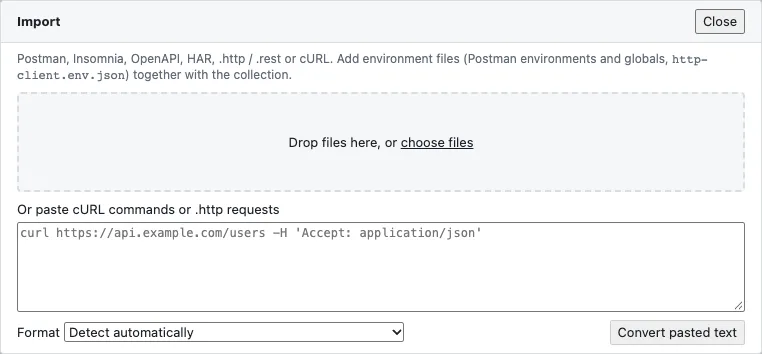
- Click Import at the top left or choose Import collection… in the command palette.
- Drag the export files onto the area or click choose files. Environment files belong with them: for Postman the environments and globals, for .http the
http-client.env.json. - For single cURL commands or .http requests, paste the text into the field below and click Convert pasted text. Format is set to Detect automatically; choose it yourself only if detection gets it wrong.
- Read the loss report (see below).
- Click Choose folder and import and pick the folder in which the new collection is created.
The loss report
Every import delivers a loss report1. It names every loss with its location (for example Users / Get user), its kind and its effect, grouped by area:
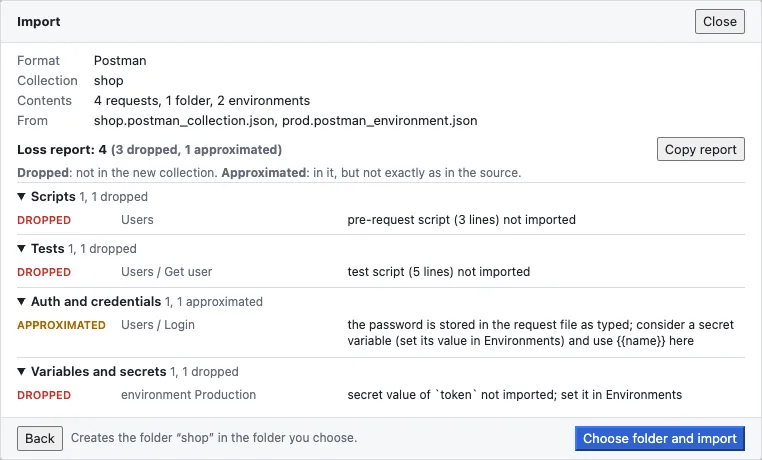
- Dropped: not in the new collection.
- Approximated: in it, but not exactly as in the source.
Copy report copies the report as text, for example for a ticket. A report with losses does not stop the import; you decide whether the result is good enough.
Secrets and credentials
RequestTailor never writes secret values from the source: Postman variables of type secret, Insomnia private environments and the JetBrains private env file become secret variables without a value. You enter the value afterwards under Environments (secret variables). Credentials typed into requests stay as in the source – each gets a report line suggesting a secret variable. Otherwise the secret scanner catches them before the first commit.
Scripts and tests
The import takes over scripts and tests from Postman and Bruno unchanged; pm.* and bru.* run through shims on the RequestTailor script API. The report names the places that use an unsupported API. More in Scripts, tests and runner.
On the command line
rt import shop.postman_collection.json prod.postman_environment.json --out ./shop
rt import api.yaml --format openapi --out ./api --json
--out must be new or empty. --format is postman, insomnia, openapi, curl, har or http; without it, rt detects the format per file. Exit code 0 once the collection is written – even if the report lists losses –, 2 if the files cannot be read or --out is in use.
See also
- Features at a glance Features · dateien
- Docs Collections as files
- Docs Environments and variables
- Docs Scripts, tests and runner
- Docs rt command line
- Sources Importers1 · Shims2